NOTE: Status of mapping effort was last updated 10-29-2012. If you want information in between updates, please contact Terri Arnold.
Available Data
Information from the LULC Field Data Sheets entered in NAWQA data warehouse can be retrieved from the folder called "Land Use Land Cover" under the "Ground Water Ancillary Data" Business Area of the warehouse.
Land Use/Land Cover Spatial Data (Updated 10-29-2012)
Table showing which LUS and SUS networks were active in cycle 1 and/or 2, number of wells in the network during each cycle, year of LULC mapping, and year of Decadal Sampling of whole networks. (last update 01/04/2012)
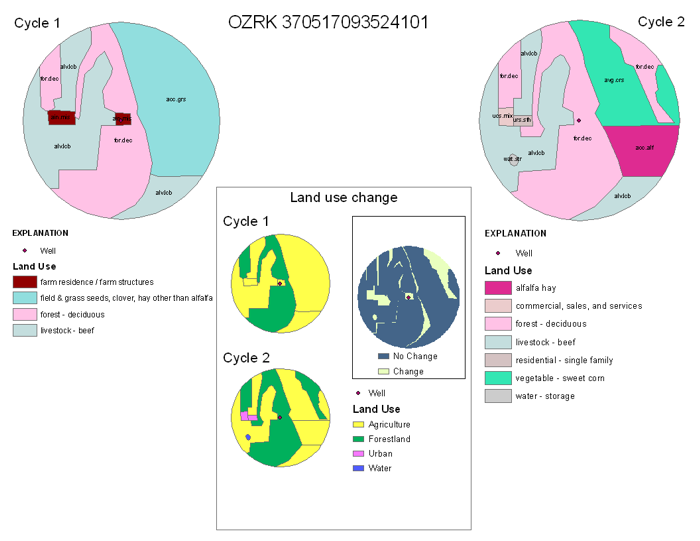
Maps showing land use and land use change between cycles
Presentations (Internal USGS audience)
Planning a Land-Use Characterization (LULC) of NAWQA LUS Wells for New or Resampled Networks
February 2 and 11, 2011 (PPT presentation, 5Mb) Presentation notes
Planning a Land-Use Characterization (LULC) of NAWQA Well Networks-- Updating Cycle 1 LULC mapping
July 27, 2009 (PPT format, 6Mb, download to see notes)
Field-Mapped Land-Use (LULC) Characterization of NAWQA Well Networks
February 28, 2008 and March 5, 2008
(PPT format, 2Mb, download to see notes)
Decide when to collect LULC information: General description of LULC, guidelines, instructions for Ag and Orchard LUS networks, instructions for Urban LUS networks, and how to characterize roads
Review these resources: LULC definitions, LULC field data sheet, Spatial data, Imagery sources, NAWQA guidance
Follow the guidelines given in the section LULC mapping in a nutshell: What to take to and do in the field
Notify Terri Arnold (tlarnold@usgs.gov) of the network sucode and date that the LULC data sheet information was entered into the data warehouse (step 5 above)
Land-use study well networks provide data on shallow ground-water quality beneath a targeted land use. The land-use study well networks are entirely sampled once each NAWQA cycle (called the decadal sample). Land-use characterization is needed to provide a context for interpreting water-quality conditions at the time of water-quality sampling and changes in water quality over time. LULC consists of mapping the land use and compiling information about irrigation, drainage, and potential point sources of contamination within 500 meters of the well. Land use is digitized using ArcGIS and potential point sources of contamination are entered into an on-line database. General steps to follow are outlined above and more detail is provided in later sections of this web page.
Land-use Characterization (LULC) is required when an entire land use-study network is sampled or resampled. Characterization is required for all wells in the land use network (AG, Urban, or Orchard LUS) and also for all associated reference wells. LULC is not done during biennial sampling.
Data should be collected when crop types can be identified in the field – usually once the crops have attained a full vegetative cover. Local agricultural extension agents or others familiar with agriculture in your study area should be able to give guidance on the best time during the growing season when specific crops can be identified. They may also be able to provide suggestions on how to identify the crops. Features and crops should be mapped and classified if they occupy at least 5 percent of the well buffer. The majority of the crops found on this list are grown in only a few areas of the country and therefore will be mappable in only a few Study Units. The classification scheme provides several categories of “unknown“; please use this category only as a last resort! In addition to identifying the crop in a field, you will also need to indicate if the field is irrigated or non-irrigated, and the method of drainage: subsurface (i.e. tile drains) or surface. Roads rarely occupy 5 percent of the well buffer area, therefore, fields separated by a road can be split down the middle of the road, with half of the road included in each the agricultural field.
Urban LUS Studies
There is not an optimal season to collect urban land-use data. Features that occupy at least 5 percent of the well buffer should be mapped and classified. In urban areas, only major highways or interchanges usually meet the 5 percent criteria for mapping; therefore, other roads do not need to be mapped and can be included with the dominant land-use category. In instances, where a road separates an urban use from, for example, a park, the road should be included with the urban use and not the park.
generally collected during non-growing season (leaf-off conditions).
well-suited for Urban land-use studies.
contact your State USGS Mapping Liaison if you need help aquiring this imagery
USDA - National Agricultural Imagery Program (NAIP)
free and delivered through FTP
can download by county. Goto http://datagateway.nrcs.usda.gov/ click on Get Data. Download via County, scroll down to the most recent National Ag. Imagery Program Mosaic, under Ortho Imagery.
collected during growing season (leaf-on conditions).
well-suited for Ag land-use studies.
USDA - National Agricultural Statistics Service CropScapes (NASS)
WRIR 98-4107. Ground-water data-collection protocols and procedures for the National Water-Quality Assessment Program: collection, documentation, and compilation of required site, well, subsurface, and landscape data for wells
OFR 96-217. Urban land-use study plan for the National Water-Quality Assessment Program
OFR 95-399. Ground-Water Data-Collection Protocols and Procedures for the National Water-Quality Assessment Program: Collection and Documentation of Water-Quality Samples and Related Data
OFR 95-398. (general GW guidance) Ground-Water Data-Collection Protocols and Procedures for the National Water-Quality Assessment Program: Selection, Installation, and Documentation of Wells, and Collection of Related Data
OFR 89-396. (pilot and early cycle 1 info) Well installation and documentation, and ground-water sampling protocols for the pilot National Water-Quality Assessment Program
LULC Mapping In a Nutshell: What to take to and do in the field
Most of the work can be completed in the office by a GIS-skilled person before you go to the field. Make sure all of your sampling sites are in Project Networks before you begin mapping the land use. Use ArcGIS to do preliminary mapping of land use over the latest aerial imagery and any previous LULC mapping from cycle 1. Identify land-use categories from the aerial imagery and previous LULC mapping (use the approved land-use codes). Use your field trip to field-check and verify the preliminary mapping that was done while in the office and to fill out the field data sheets for each well. When you return to the office, update the land-use mapping as needed, write the metadata for the spatial data, enter the field sheet data into the on-line database, and submit your data to Terri Arnold.
If you are updating/re-mapping land use for a site, delineate the updated land-use in ArcGIS using the the latest aerial imagery and the previous LULC characterization as a basis for your mapping. Identify the polygons with the appropriate LULC codes. Compare the new LULC characterization to the previous characterization. Did the land use change or were land use polygons previously miscoded? Use your field trip to field-verify or field-check the characterization you made in the office. Compare the old and updated LULC characterizations with the latest National Landcover Dataset. Are the land use categories shown similar among the maps?
If you are characterizing the land use at a well for the first time, delineate the land-use characterization in ArcGIS using the latest aerial imagery. Identify the polygons with the appropriate LULC codes. Use your field trip to field-verify or field-check the characterization you made on the paper map. Compare the new LULC characterization with the latest National Landcover Dataset. Are the land-use categories shown similar among the maps?
While in the office:
Make sure all of your sites are in Project networks.
Print out the LULC codes and categories with descriptions and highlight the codes most commonly used in your area.
Download the NAWQA point geodatabase of all NAWQA sampling sites and use it for the locations of your wells in ArcGIS.
Locate the most recent aerial imagery or use the ESRI world imagery layer (see the imagery sources section above)
Delineate the land use for each well using the aerial imagery and any previous LULC mapping as a base. You can download the previous LULC spatial geodatabase, and edit it to update the LULC. Map only areas that occupy at least 5% of the 500-meter buffer. See the When to Collect LULC section above for instructions on how to digitize roads. See Mapping Tools and Requirements for more information about how to digitize the LULC; what is required for the spatial data; FAQs; and Troubleshooting.
Attribute the land use polygons using only the approved codes.
Print out a map for each well using ArcGIS. Include the well point, the 500-m buffer around the well point, the newly digitized land-use polygons with labeled land-use categories, and the latest aerial imagery. Include the site ID, well name, and scale of the map.
Print out a LULC Field Data Sheet for each well. You can pre-fill the forms with Station identification and location information.
Field-check and field-verify that the maps of land-use characterization that were made in the office represent the actual land use in the area around the well.
While parked near the well take photos of the well in the four compass directions and take notes for your records. Specially note any irrigation or drainage features in the 500-meter buffer area.
Fill out the LULC Field Data Sheet for each well. Refer to your maps, photos, and any notes.
When you get back to the office:
Update the land-use attributes and polygons in ArcGIS if needed as indicated by your field-verification.
Make sure your spatial data meets the requirements and write metadata for your network. See the Mapping Tools and Requirements section.
Enter your field sheet data into the Data Warehouse on-line database. See the instructions.
NOTE: If you are updating/re-mapping land use for a site, please use the previously mapped land-use polygons and attributes as a starting point. You can download the previous LULC spatial geodatabase, and edit it to update the LULC. Previous LULC re-mapping efforts have resulted in erroneous indications of land-use change because study units did not use prior LULC characterization as a basis for updates. Other apparent land-use changes occur when the cycle 1 and cycle 2 well points do not have identical spatial coordinates which causes the 500-m buffers for cycle 1 and cycle 2 to be offset from each other. If for some reason, the coordinates of a well point are updated or changed, or the well point for cycle 2 is not identical to the well point used in the cycle 1 characterization, document the update in the metadata for the network. Please see the troubleshooting FAQs for more information.
REQUIRED Spatial Data Format and Naming Convention
I will accept the following spatial data format (listed in order of preference):
PREFERRED: One file geodatabase named as SUID with featureclasses for each site named by cpg index number and featuredatasets of land use, buffers, and points named as cpg index number and postfixed by the data topic (_lu, _buf, or _ptc). For example for study unit UIRB, the geodatabase would be named UIRB.gdb and have a featureclass for site w10 and featuredatasets in the w10 featureclass named w10_lu, w10_buf, and w10_ptc. If you use the NAWQA point geodatabase of all sampling sites, you do not need to include the _ptc later but note the source of your points in the metadata for the network. This is the preferred format.
For each individual site in the network, separate shapefiles of land use, 500-meter buffers, and points. Shapefiles of land-use data should be named with the cpg index number and postfixed with _lu (example: w10_lu). Shapefiles of buffers should be named with cpg index number and postfixed with _buf (example: w10_buf). Shapefiles of points should be named with cpg index number and postfixed with _ptc (example: w10_ptc). Shapefiles should be organized inside a folder named with the SUID.
REQUIRED Projection
The projection/coordinate system must be defined in all spatial data. Use the standard NAWQA National Albers projection which can be found in ArcMap in USGS_Favorites (named Albers_CONUS_NAD83.prj). Here are the parameters:
YEAR, 4, 4, Integer field [Year land use mapping was completed]
IRRIG, 4, 4, Character field [possible codes are I=Irrigated, NI=Not Irrigated, MX=Mixed Irrigation]
DRAIN, 4, 4, Character field [possible codes are ND=no structural drainage enhancement, ES=enhanced drainage that promotes SURFACE water runoff (ex. tile drains, lined or concrete ditches, storm sewers), EG= enhanced drainage that promotes GROUND water runoff (ex. dewatering well, unlined infiltration catchment, runoff retention ponds), or ESG=enhanced drainage that promotes surface- and ground- water runoff (ex. unlined ditches, low capacity ponds, or catchments with spillways)]
Buffer data must have the following attributes:
STAID, 15, 15, Character field [USGS station id number]
Point data must have the following attributes:
STAID, 15, 15, Character field [USGS station id number]
REQUIRED Metadata for LULC Spatial Data
Simple metadata is required for each network of wells submitted. Please follow the template to make metadata (one metadata file is required per network) and name the file with the SUID and netcode (for example: lirbluscr1.txt). Save the metadata file in the data/SUID directory where you created the spatial data. Please make a special effort to document wells that may be 'the exceptions' -- for example, wells that had to be moved to a location other than originally recorded, wells that were dropped from the network, etc. Here is an example of what is expected in the metadata.
REQUIRED Imagery or Map of LULC with imagery in background for each well in PDF format
To preserve the imagery used to characterize the land use, please submit a copy of the image used for each well for archiving. If you obtained geotiff images from sources other than the ESRI World Imagery Layer, please submit copies of the geotiffs. Name your geotiffs with the well STAID (for example 452615089132001.tiff).
If you use the ESRI World Imagery Layer in ArcGIS, save a PDF of the LULC mapping with the imagery in the background and name the PDF with the well STAID (for example 452615089132001.pdf). In ArcGIS, export the map as a PDF and use the general option of "300 DPI" output resolution, and the advanced option of "Export PDF Layers and Feature Attributes" and check the box to "Export Map Georeference Information". Items to include on your PDF map include
(Example of PDF Map Optimized for Web 1 Mb | Full Resolution 18 Mb):
imagery
well point
land use polygons
date map was created, STAID, SUCODE, and cpg index number in upper left corner
date and source of the imagery in upper right comer. If you are using the ESRI World imagery layer, you can find the date by clicking on the image with the information tool in ArcGIS.
Sites must exists in the NWIS site file of your Water Science Center. Note: time required to accomplish this will vary among Water Science Centers.
NAWQA network information for sampling sites must be entered into Project Networks. Once your sites are entered into Project Networks, the network information is automatically uploaded into NWIS and then into NAWQA data warehouse. Note: allow at least two weeks for this process to be completed.
Contact Jessica Thompson (jlthomps@usgs.gov) to request a special login to the NAWQA Data warehouse 'Land Use at Wells App.' A unique user ID and password are required to enter the LULC data).
Steps to do after collecting the LULC data:
Enter information from LULC Field Data Sheets in NAWQA data warehouse. There is a special 'Data Entry and Exchange' area in data warehouse where the LULC information is entered. From the NAWQA data warehouse internal home page, go to 'Data Entry and Exchange' then to 'Land Use at Wells App.' A unique user ID and password are required to enter the LULC data and can be requested from Jessica Thompson (jlthomps@usgs.gov). The LULC login and password are different from your regular NAWQA data warehouse ID and password.
Send an email to Terri Arnold (tlarnold@usgs.gov) stating the network name and the date the LULC data sheets were entered into NAWQA Data Warehouse.
WinZip the data/SUID directory containing the (1) spatial data of well locations, (2) well buffers, (3) land use polygons, (4) imagery, and (5) metadata. Name the file with the SUID and netcode (for example: lirbluscr1.zip).
Send DVD/CD with a copy of the WinZipped data/SUID directory to (Note: Keep a copy of this directory for your archive files):
Terri Arnold
1201 W. University Ave, Suite 100
Urbana, Illinois 61801
OR
email tlarnold@usgs.gov an FTP address where the file can be downloaded from
For more information, contact:
Terri Arnold
tlarnold@usgs.gov
217-328-9702
U.S. Geological Survey Intranet
URL: http://water.usgs.gov/nawqa-only/luchar/index.htm
Page Contact Information: Terri Arnold (email tlarnold)
Page Last modified: Monday, 29-Oct-2012 15:59:53 EDT