NAWQA Land Use/Land Cover (LULC) Characterization
|
|
FAQs: Troubleshooting LULC mapping |
||
|
Problem: My well point coverage doesn't overlay the digital orthophoto Suggestion: Check that the well point is in the correct location and re-create the point and buffer coverages if needed. Often the well point coverages are created based on the coordinates used to assign the site ID number (STAID) when the site is first established. Later in the field, the well location is measured using a GPS and the coordinates are corrected in the NWIS data base and NAWQA data warehouse, but the well point coverage is not updated. |
|||
|
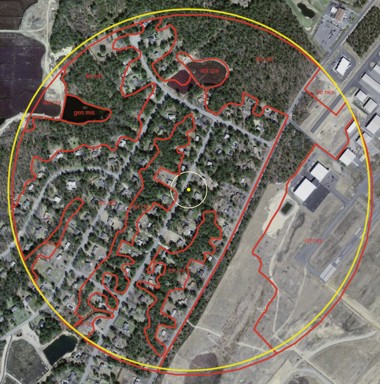
Problem: My Cycle 1 and Cycle 2 buffers do not align properly. In some instances the well locations used on the Cycle I aerial photos and mylar for digitizing are incorrect. This is probably due in part to the large scale photography used in Cycle I. An example is described below. The approximate location used for cycle I LULC is shown in figure 1 (cyan colored dot, this location is based on aerial photo and mylar overlays used in cycle I LULC processing). The large dark blue circle is a 500 meter buffer based on this location and this buffer coincides with the LULC buffer (red circle) and polygons (red line work) developed for cycle I. The true location of the well is shown in figure 1 (black dot) The 500 meter buffer for this location is shown as the yellow circle and the 50 meter buffer is shown as the light blue circle. Based on our knowledge of this area, there has been no land use change since the cycle I work. However, higher resolution imagery and proper location of the well would lead to changes in the polygons and potential changes in the land use percentages. How should we proceed?
Suggestion: - Use the correct well point and generate a new buffer that corresponds to the correct well location. Later, when we calculate the land-use change, we will consider only the area of overlap between the two time periods of land-cover mapping. If the area of overlap is less than a certain percent of the new 500-m buffer (percent area still to be determined) then the land-use change would not be calculated for that well. |
|||
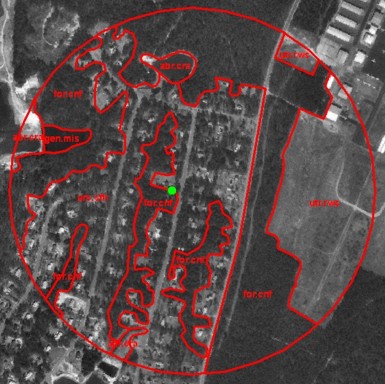
| Problem: I have higher resolution imagery for cycle 2 than was available in cycle 1. The cycle 1 land use polygons are very generalized and don't follow the new imagery very well. I could improve the level of detail for cycle 2 if I don't use the cycle 1 polygons. What should I do? | |||
|
Cycle 1 photo and cycle 1 mapping
|
Cycle 2 photo and corrected buffer (shown in yellow) and cycle 1 mapping (shown in red):
|
||
|
Suggestion: Generally, higher resolution imagery is available for cycle 2 than was available during cycle1. Please avoid the temptation to add detail to the polygons of cycle 2 that were not there in cycle 1 unless the added detail represents a true change in land use. Use the land-use polygons from the cycle 1 mapping as a base for re-mapping in cycle 2. Unless you plan to also remap the entire cycle 1 land use with higher resolution images, do not add unnecessary detail to the cycle 2 polygons that should in reality be the same as the cycle 1 polygons because this added detail would imply a change in land use where there was none. |
|||
|
Problem: I am having trouble digitizing the land-use polygons in ArcGIS. Suggestion: There could be numerous answers to this one...following are the most common helpful suggestions (Aslo read through the LULC Digitizing Quick Start Guide):
|
|||
|
Problem: I saved before closing ArcGIS, but my recently digitized land-use polygons and/or attributes have disappeared when I look at my edited data layer again. Suggestion: Be sure and use the 'save edits' under the Editor menu after you digitize your polygons. The 'save' under the ArcMap File menu only saves the map file; it does not save any edits to data sets. |
|||
Question: What is a CPG index number and how do I know what the number is for my site? Answer: The CPG index numbers were established because the early versions of ARC Info we used could not have 15 digit coverage names (such as a STAID); therefore, we had to find an alternate naming convention to uniquely identify each well. The CPG index numbers are a sequential numbering of all the wells that have been characterized in a Study Unit. If this is a re-characterization of a cycle 1 network, then you would locate and use the CPG index number that was previously assigned to each well. However, if this is the first characterization for this network, you'll have to give the wells a new CPG index number. To figure out what the CPG index number should be look at the staidindex.dbf file on the LULC Spatial Data page (near the bottom of the page) Filter column A on your Study Unit abbreviation and locate the highest index number already assigned (column C). For example if the highest index number previously assigned to your Study Unit's wells is w62. You would begin numbering your new wells with 'w63' and increase the numbers incrementally by one. Sort the new STAIDS in numeric order first and then assign the sequential CPG index number.
|
|||
|
U.S. Geological Survey Intranet URL: http://water.usgs.gov/nawqa-only/luchar/TroubleshootingFAQ.htm Page Contact Information: Terri Arnold (email tlarnold) Page Last modified: Thursday, 21-Jun-2012 14:38:10 EDT |

![testLU4norm [Converted].png](images/FAQ_example1.jpg)