
Internal USGS Access Only
Internal USGS Access Only
The shape, coordinates, and associated URLs are stored in
a separate file called a map file. The suffix of the map file must
match what the web-server expects for imagemaps, usually either
.imf or .map.
An example of an server-side image map and its associated file:
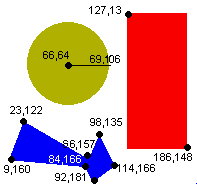
<a href="imagemap.imf">
|
Sample .imf file:
default none.html
# You'll be glad you commented your file
|
Note: Server-side imagemaps use the ISMAP attribute in the IMG tag with a link to a map file containing the shapes, URLs and coordinates (rather than the USEMAP attribute of client-side maps).
Additional information on server-side imagemaps can be found on the NCSA Imagemap Tutorial
![[back]](images/a_left.gif)
![[up]](images/a_up.gif)
![[forward]](images/a_right.gif)
|
"Mastering a Web Site" online course Created and maintained by Lorna Schmid and David Boldt. http://water.usgs.gov/usgs/training/webmaster/server_side_maps.html Last modified: Wed Mar 10 09:21:41 EST 2004 |