
Internal USGS Access Only
Internal USGS Access Only
An example of an imagemap and the associated html:
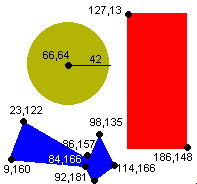
<img alt="ImageMap Example" title="Sample ImageMap"
src="images/mapic.gif" |
default" is used to
set a default URL for clicks outside of the defined areas. The
"nohref" attribute means to
ignore clicks in the given area. The use of nohref for
the default in the example above is actually the
default, and so is not necessary.
alt="text" for each area
shape provides text for a selectable list for users accessing
your page with a text based browser. Netscape 4.x displays a
tooltip window for rectangles only and Internet Explorer
displays a tooltip window for all shapes.
title="text" for each area
shape provides tooltips for Netscape 6/7. Title for
main image sets heading for text only browsing.
The CSS attribute style="border-style:none"
could have been used in the IMG to stop the browser from drawing a
hyperlink border around the image.
Browser alert: When
defining an area shape a simple return in your html
after coordinates is fine, but do not put in a tab to align your
html. Netscape was able to process the coordinates while IE
failed to properly define the areas when tabs were used.
Original source for this page is from UNSW, Sydney, Australia, URL http://www.fbe.unsw.edu.au/Learning/HTML/Ref/imgmaps.htm
and has been modified for this course.
slide 30
Lab Exercise on Graphics
Lab Exercise on
Image Maps
![[back]](images/a_left.gif)
![[up]](images/a_up.gif)
![[forward]](images/a_right.gif)
|
"Mastering a Web Site" online course Created and maintained by Lorna Schmid and David Boldt. http://water.usgs.gov/usgs/training/webmaster/client_side_maps.html Last modified: Wed Mar 10 09:26:44 EST 2004 |