Try coloring the grid with the Kx data set. You will probably find that the hydraulic conductivity distribution doesn't look right. Many cells will have a value of 0. (You can check the values of cells using the Grid or Mesh Value dialog box.)
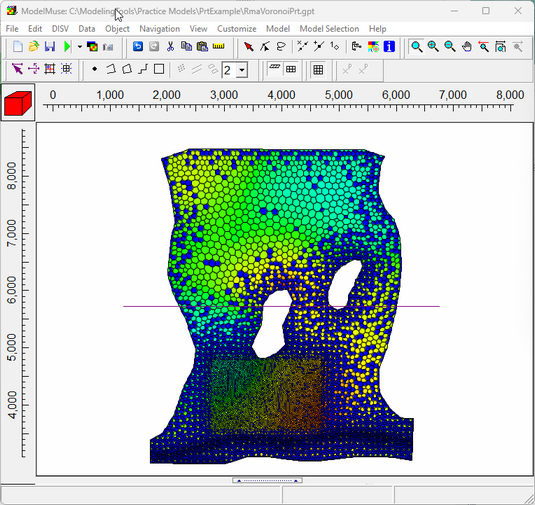
Screen capture of the main ModelMuse window showing the problematic hydraulic conductivity distribution in the new DISV mesh.
The problem is that the object that sets the value of the RmaMf6Completed_Kx_1 data set only sets the values of cells intersected by the object. The points in that object were located at the centers of the previous quadtree refined grid. Fixing this requires two changes. First the data set need to have a suitable interpolator specified. Second, the object that sets the values of RmaMf6Completed_Kx_1 needs to set values by interpolation.
Set the interplator in the the Data|Edit Data Sets dialog box.
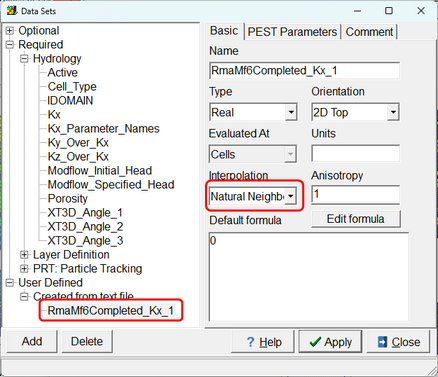
Screen capture illustrating the specification of the Natural Neighbor interpolator for the RmaMf6Completed_Kx_1 data set.
Edit "Object33" and check the Set values of cells by interpolation check box.
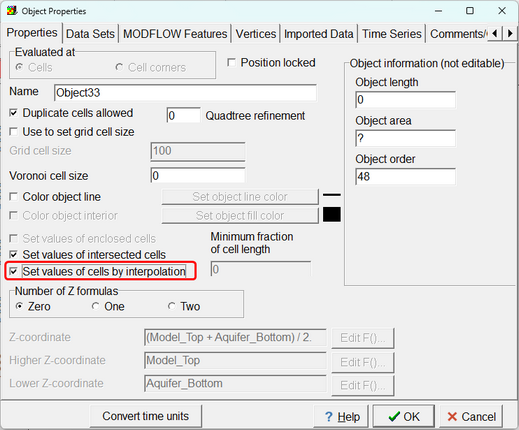
Screen capture of the Object Properties dialog box showing the Set values of cells by interpolation checkbox checked.
