
Internal USGS Access Only
Internal USGS Access Only
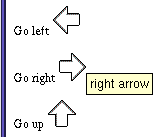
| Three Different Displays for the ALT attribute | ||
|---|---|---|
<p>Go left <img src="left.gif"></p> <p>Go right <img alt="right arrow" src="right.gif"></p> <p>Go up <img alt="" src="up.gif"></p> |
||
| Lynx | Netscape with Graphics | Netscape without Graphics |
Go left [INLINE] Go right right arrow Go up |
 |
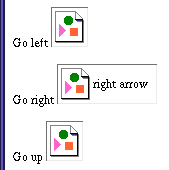 |
The correct use of the ALT attribute is to provide information which can be used when the graphic is not available. The Html 4 attribute TITLE is intended to provide for the function of pop-up information when the cursor is placed over an object, and is implemented in IE 5 or later and Netscape 6 or later.
Use an empty ALT attribute (alt="") for graphics which are purely decorative. Run lynx to see that the ALT information makes sense in the context of the page.
Avoid "blue dot" for colored bullets, and similar substitutions which will make no sense in a text-only view.
The Art of ALT: Creating effective ALT text for inline images is a key element in creating a usable, high-accessibility Web Site. But what makes for effective ALT text?
slide 32
![[back]](images/a_left.gif)
![[up]](images/a_up.gif)
![[forward]](images/a_right.gif)
|
"Mastering a Web Site" online course Created and maintained by Lorna Schmid and David Boldt. http://water.usgs.gov/usgs/training/webmaster/alt_tag.html Last modified: Tue May 06 16:41:15 Eastern Daylight Time 2003 |