The DISV Quality Metrics dialog box calculates Min_Crossing_Angle and Min_Crossing_Fraction for each cell in the DISV mesh. In an ideal mesh, Min_Crossing_Angle would be 90 degrees and Min_Crossing_Fraction would be 0.5 because on of the assumptions in calculating the flow between cells is that the line connecting the centers of two neighboring cells passes perpendicularly through the center of the boundary between the cells. (Strictly speaking the requirement is "For accurate solutions, the standard CVFD formulation requires that a line drawn between the centers of two connected cells should intersect the shared face at a right angle ... . Furthermore, the intersection point should coincide with an appropriate mean position on the shared face" (Langevin and others, 2017).) Typically, cell centers are placed within the cell. However, sometimes when cells are at the edge of the grid, the cell center might be located on the edge of the grid. An example of such a mesh is included in the MODFLOW 6 examples: ex-gwt-adv-schemes\gwf_voronoi.
If the user wants to manually examine cells where the quality metrics are unfavorable, the user can create a data set that uses the default formula Min_Crossing_Angle or Min_Crossing_Fraction and then color the grid with that data set to visualize where problematic cells area located. The user can also display the connections between cells using View|Show Cell Connections.
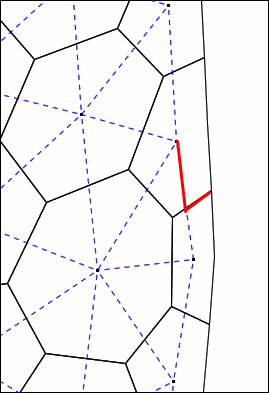
The red lines illustrate the minimum crossing angle for a cell.
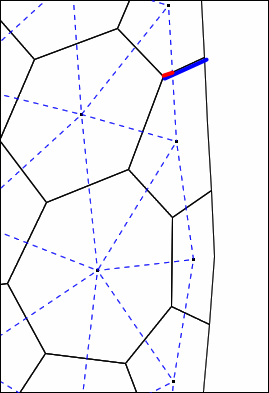
The length of the red line divided by the length of the solid blue line would be the crossing fraction for the two cells on either side of the solid blue line.
