By default, CHD boundaries are treatedby PRT as being spread through the whole cell. You can change this using the IFLOWFACE_CHD data set. Assigning a value of -1 will cause PRT to treat the flow as coming from the top of the cell. A value of -2 means it comes from the bottom of the cell, A value of zero (the default) means the boundary encompasses the whole cell. Positive values means that flow comes from one of the vertical faces. For structured grids, 1 is the side on the west, 2 is the side on the north, 3 is the side on the east, and 4 is the side on the south. For DISV grids, you can use the Grid or Mesh Value dialog box to see how positive values are related to the sides of the grid cell under the cursor.
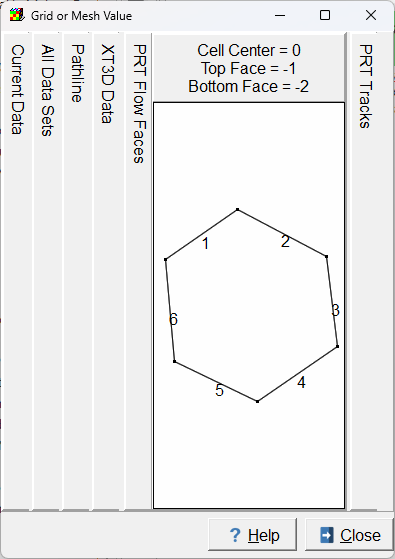
Screen capture of the Grid or Mesh Value dialog box showing the assignment of IFLOWFACE for the DISV cell under the cursor.
