



The Lighthouse Project
U.S. Department of Interior
U.S. Geological Survey
The Lighthouse Project
U.S. Department of Interior
U.S. Geological Survey
Active Directory Design/Central
Administration Team
Designing an Active Directory for USGS
Desktop/Server Applications and Services
Documentation, Training, and Support
Active Directory Deployment Team
Active Directory Operations and Maintenance
Team
Active Directory Technical Review Board
(ADTRB)
Transition from Test Environment to
Production Environment
Operations and Maintenance Guidelines
New OU Requirements Guidelines
Active Directory Deployment Timeline
In January 2000,
the Information Chiefs (IC) chartered a team called the Windows 2000
Investigation Team (WIT) to investigate the Microsoft Windows 2000 (Win2K) operating
system. The WIT was to recommend what,
if any, Bureau level actions need to be taken to ensure successful deployment
of Win2K and its integration within the existing USGS systems and network
operations. The WIT presented their
recommendations at the USGS Information Technical Exchange Meeting (ITEM) 2000
during the week of June 26, 2000. One
of the recommendations from the WIT was to create a Bureau-level Active
Directory (AD) Design and Implementation Team that will work with professional
consultants to design, plan, and implement an Enterprise Active Directory
infrastructure for the USGS.
In May 2000,
Microsoft and Compaq gave the ICs a presentation on the Lighthouse
Project. The Lighthouse Project is a
joint effort between Microsoft and one of their cooperative partners, Compaq in
this case, to help "jump start" selected clients from the initial
planning phase to the test phase and then to a limited actual deployment of
Windows 2000. According to the
Memorandum of Understanding (MOU) dated August 2000, the USGS agreed to do the
Lighthouse Project with Microsoft and Compaq as a "gratuitous"
service contract to deploy Windows 2000 Active Directory. This means that the consulting services is
limited by the level of funding provided by Microsoft and Compaq, ~$75K. The
MOU calls for Microsoft and Compaq to take the lead in both planning and design
meetings and in creating the meeting documents. They are to provide technical assistance as needed. The USGS will provide the technical
resources (personnel and equipment) to facilitate the knowledge transfer and to
assist with technical questions that may arise.
The USGS
Lighthouse Team is comprised of computer professionals that possess expertise
in networks, directory services, security, Windows NT and Windows 2000. The members are from all the various
disciplines and regional geographic locations of the USGS.
|
Name |
Location |
Telephone |
Email Address |
|
Stu Doescher |
NMD - Sioux Falls,
SD |
605-594-2526 703-648-7128 |
doescher@usgs.gov |
|
Brian Rood |
BRD - Onalaska, WI |
608-783-7550 x35 608-781-6303 |
brian_rood@usgs.gov |
|
Scott Brondel |
NMD - Rolla, MO |
573-308-3761 |
sbrondel@usgs.gov |
|
Ed Brown |
GD - Vancouver, WA |
360-993-8910 |
ecbrown@usgs.gov |
|
Larry McIrvin |
NMD - Reston, VA |
703-648-4664 |
lmcirvin@usgs.gov |
|
John Schwegmann |
NMD - Menlo Park, CA |
650-329-5612 |
jschwegmann@usgs.gov |
|
Mike McTootle |
GD - Reston, VA |
703-648-4939 |
mmctootl@usgs.gov |
|
Roy McCullough |
APS - Reston, VA |
703-648-7061 |
rmccullough@usgs.gov |
|
Sam Martinez |
WRD - Denver, CO |
303-236-1834 |
scmartin@usgs.gov |
|
Mike Kandrac |
APS - Reston, VA |
703-648-4176 |
mkandrac@usgs.gov |
|
Linda Peng |
NMD - Reston, VA |
703-648-7025 |
lpeng@usgs.gov |
|
Janet MacNab |
DOI -Washington,
D.C. |
202-208-5274 |
Janet_MacNab@os.doi.gov |
|
Brendan Moon |
Compaq - Waldorf, MD |
301-893-8310 |
Brendan.Moon@compaq.com |
|
Robert DeLuca |
Microsoft -
Washington, D.C. |
202-257-8426 |
rdeluca@microsoft.com |
|
Scott Thatcher |
Microsoft -
Washington, D.C. |
202-274-7531 |
sthatch@microsoft.com |
|
Steve Foley |
Microsoft -
Washington, D.C. |
202-274-1435 |
stephenf@microsoft.com |
|
Bob MacFarlane |
Compaq - Greenbelt,
MD |
301-918-5570 |
Robert.MacFarlane@compaq.com |
As the bureau
reorganization progresses, the need for an easier and more efficient way to
manage and secure our computers and resources is critical. Currently, there are over 600 servers
running Windows NT4 and Windows 2000 Server/Advanced Server in the USGS. There are also about 13,000 desktops/laptops
running Win9x, NT4, and Windows 2000 Professional. A large number of these Windows NT/2000 systems are either in
stand-alone mode or are in NT-based domains.
A
major problem with the current USGS Windows NT environment is the existence of
many separate domains, each uniquely configured and managed to satisfy a local
need. This creates an environment that
promotes hampered data sharing, inconsistent reliability, inefficient resource
management, and poor security. Sharing of
resources between projects or sites, synchronizing user accounts, or sharing of
information between NT environments anywhere in the Bureau is practically impossible
with the current environment.
Additionally, the distinctness of each NT environment also makes
interoperability with other Bureau systems such as Lotus Notes™ impossible.
The goal of the
Lighthouse Project is to break down these existing barriers of communication
between sites, disciplines, and geographies.
A unified Windows 2000 Active Directory design will establish an
enterprise infrastructure that all disciplines may use for new Windows 2000
environments. Existing isolated
environments based on earlier versions of Windows NT may be migrated to the new
one at any time. Moving user accounts,
data, and servers into an enterprise Active Directory infrastructure will ease
data sharing, improve reliability, simplify resource management, and tighten
security.
The foundation
for Microsoft’s future technologies is Windows 2000. Existing and future Windows-based IT solutions will require the
presence of a Windows 2000 infrastructure to operate. If a Bureau-wide implementation of Windows 2000 Active Directory
does not occur, the existing “stovepipe” NT environments are likely to upgrade
to Windows 2000, remaining distinct environments with no ability for improved
interoperability. Implementing Active Directory will also provide
interoperability for non-Windows clients such as Unix and Macs. As the
bureau reorganization takes place security is a major concern; the time to change
and improve our current NT environment is now. The Lighthouse Team identified
this as an urgent need and stated it in their vision statement.
We envision an
IT infrastructure that facilitates the exchange of ideas and earth science data between USGS
disciplines, government agencies, and the public. We will provide a highly reliable Enterprise computing environment
that enables access to information and computer resources in a collaborative
manner that is effective, efficient, and secure.
Building an IT infrastructure for the
USGS
Windows 2000
is positioned to become a critical part of the USGS infrastructure over the
next few years. Windows 2000 includes features such as Microsoft® Active
Directory®, Dynamic DNS, Enhanced Security, and many other features
that will be very beneficial to USGS, but these features can be extremely
complex to implement. Making these advances available can require months of
planning, implementation, and training so that Windows 2000 will function
as needed within the USGS environment. The Lighthouse Project is the first step
towards building the foundation.
Some examples of
benefits for having Active Directory implemented in the USGS include:
The workshop was
held at the National Center in Reston, VA, during the week of October 22,
2000. One of the topics discussed was
the project implementation approach. It
was agreed by all those in attendance at the workshop that this project should
proceed in four phases.
Phase 1 is the Envisioning Phase, which began
with the Vision and Planning workshop.
During the weeklong meeting, the team identified the scope for the
project, performed a risk assessment, and formed working groups to focus on the
specific areas of investigation.
Phase 2 is the Planning Phase, which included a
detailed Project Plan that outlined plans for Phase 3. The hardware was procured and delivered to
the appropriate test sites. The servers
were installed and configured by the designated site Lighthouse team members.
Phase 3 is the Testing/Development Phase, which
includes the deployment of a test environment, called "AdTest",
modeled after Compaq’s "Qtest" Windows 2000 test environment.
Phase 4 is the Deployment Phase, which will include the
establishment of a production Windows 2000 Active Directory and the pilot
migration of five existing NT domain environments.
The USGS Team
identified key areas to be investigated and what not to be investigated in the
Lighthouse Project.
·
Win2k Services required for supporting the
domain.
o
WINS
o
DNS configuration and integration with BIND
·
Active Directory planning and configuration
o
Hardware Configurations
o
Physical Locations
o
Domain Controller Placement Standards
o
Naming Standards
o
Enterprise tree structure and domain design
o
Interoperability Issues with Unix and NDS
·
Testing the AD design and network issues
·
Meta-Directory services (directory
synchronization)
·
Tested and Established Migration Strategies for
individual domain migrations
·
Policies for administration and functionality
·
Security configuration and auditing
·
Documentation
o
Preparation of buy-in package for ICs
·
Project team qualifications/training
·
Define “Ongoing Operations and Maintenance”
·
Guidance and Procedures for upgrading/migrating
clients
o
Testing of upgrade/migration procedures for
clients
·
Production pilot
o
Domains operational
o
Successful individual domain migrations
§ In
more than one physical location
§ Includes
users and data?
·
Upgrades/Migration of client workstations
·
Complete migration of all NT4 servers/domains
·
Win2k Services (features) not required to
support the domain
·
Remote Administrator training
·
End User Training
·
“Ongoing Operations and Maintenance”
· Design of DFS, COM+ and other Windows
2000 components
Summary:
The
USGS embarked on a six-month test and evaluation of Microsoft’s Windows 2000
family of products with Active Directory.
Evaluation included deployment of a multi-site test environment and
testing of fundamental Microsoft and Lotus components within the test environment. The Lighthouse Team developed a small scale
program plan, implementation schedule and designed an Active Directory in a
pure test environment. The test
environment, named AdTest, resides on nine Compaq Proliant servers in six
locations, mimicking what a production Active Directory would look like once
implemented and running. Technically,
adtest.usgs.gov resides on seven servers, and adtest.doi.gov resides on two.
The
test pilot for Active Directory commenced in late January of 2001 and is scheduled
to end on March 31, 2001. During this
period of time, a significant number of tests, benchmarks and studies were
performed on the Active Directory adtest.usgs.gov
to evaluate the team’s recommended approach to implementing a Bureau-wide
Active Directory infrastructure. During
the test, workstations were configured to participate in the Domain, and a
number of users attempted to operate in the test environment while performing
typical day-to-day duties.
Lab
Configuration:
The
Lighthouse Project’s lab consists of nine Compaq Proliant servers running
Windows 2000 Advanced Server. The
locations of the servers (sites) are documented in the Team Reports – AD
Design/Central Administration section, however it is important to note that the
distribution of these servers, operating as Domain Controllers, closely follows
the recommended distribution of servers in an actual production Active
Directory environment. The Proliant
servers are typical workgroup class systems, running standard CPU, memory and
disk configurations. The test Active
Directory will remain running even after the roll out and implementation of a
production Domain and Active Directory infrastructure so additional testing,
benchmarking or troubleshooting can continue.
It
important to note that no additional hardware was required to roll out the test
Active Directory (other than the servers) as the Lighthouse Team designed the
Domain to integrate seamlessly with the existing networking infrastructure.
Conclusions:
The
Lighthouse Project’s Windows 2000/Active Directory lab has fulfilled its design
goals. Although there is still testing,
evaluations and benchmarking to be performed, the lab has affirmed the design
stability and performance aspects of the test Active Directory. It will continue to support Directory
enhancements and testing for the foreseeable future.
The following is
a list of the teams, members, and their roles and responsibilities in the
Lighthouse investigation. Team Leads
are denoted with an asterisk (*).
Desktop/Server
Systems (*Jay Schwegmann, Sam Martinez, Brian Rood)
Desktop/Server
Applications and Services
(*Sam Martinez, Ed Brown, Brian Rood)
AD
Design/Central Administration
(*Scott Brondel, Mike McTootle, Jay Schwegmann)
Network
Infrastructure (*Mike
Kandrac, Scott Brondel, Larry McIrvin)
Security (*Roy McCullough, Mike Kandrac, Mike
McTootle)
RAS/VPN (*Ed Brown, Scott Brondel)
Interoperability
(*Mike McTootle, Scott
Brondel, Sam Martinez, Roy McCullough)
Meta-Directory
Services (*Larry
McIrvin, Scott Brondel, Mike Kandrac)
Documentation,
Training & Support
(*Brian Rood, Ed Brown, Sam Martinez)
The following
section contains the team reports. Each
Focus Team was tasked to:
Members: Scott Brondel (Chair), Michael McTootle,
Jay Schwegmann
Scope of Test:
Active Directory Planning and
Configuration
a. Enterprise Tree structure and Domain
design
b. Physical placement of Domain Controllers
c. Network Services configuration (DNS and
WINS)
d. Domain Controller configuration
e. Naming Standards
f. Policies for administration and functionality
Description of the tests performed:
Designing
an Active Directory structure for an organization as geographically and
technologically diverse as the USGS is technically challenging, especially
considering that bureau reorganization is still taking place. This environment of change guided the team
to set several goals for what the overall structure should be.
Active
Directory design involves 3 distinct stages:
the Hierarchical design, Physical design and the Logical design.
Hierarchical
Design:
Windows
NT 4.0 and prior versions use the concept of the Domain Model for
authentication and resource sharing. In
Windows 2000, the Domain Model still exists, but has been greatly enhanced to
allow more design flexibility and easier sharing of resources across domains. Windows 2000 introduces the concepts of
Trees (a hierarchical arrangement of domains that share the same DNS suffix)
and Forests (a collection of Trees) that interact through automatic two-way
trusts, which drastically cuts down the amount of administrative effort
required to allow sharing of resources across domains. This becomes extremely beneficial if other
organizations want to “join” the Forest – all Trees in the Forest share a
common root, so resources and data can easily be shared throughout the entire
Forest.
However,
there are still potential problems with a multiple domain model. One example is if a user needs to move from
one domain to another – this cannot be easily done without the coordination of
administrators in both domains, and specialized tools are often required. For reasons such as this, it was decided to
create a hybrid of the above designs called a Placeholder Model:
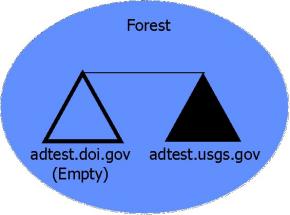
In
this design, a root domain called adtest.doi.gov (NetBIOS name adtestdoi) was
created. No actual accounts are placed
in this domain; its only purpose is to act as the root of the forest so other
domains may be linked to it. A second
domain called adtest.usgs.gov (NetBIOS name adtestusgs) was then created and
placed in the same forest as adtest.doi.gov.
Inside this domain is where the bulk of our testing for the Lighthouse
project occurred.
Physical
Design:
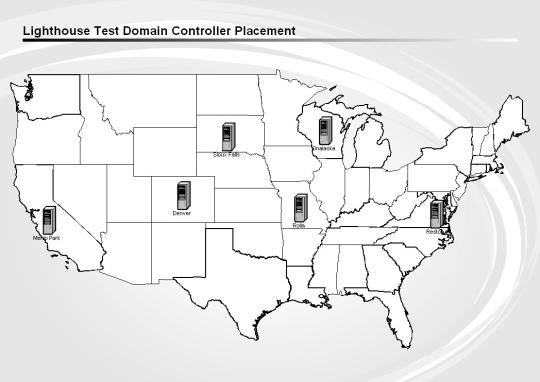
Six
test locations were chosen based on the availability of team members to help
with the testing. These locations are:
These
locations provided a very good test environment. The servers behind Onalaska and Sioux Falls sit behind firewalls,
which allowed the Lighthouse team to evaluate the minimal ports necessary for
AD replication to occur. Also, sporadic
network and routing problems that occurred in Reston and Menlo Park during our
testing also helped the team in determining what effects prolonged WAN outages
can have on an Active Directory implementation.
Active
Directory replication is managed by the creation of objects called Sites, which
are areas of high-speed connectivity connected by slower WAN links. For our testing, a Site was created for each
of the above test locations.
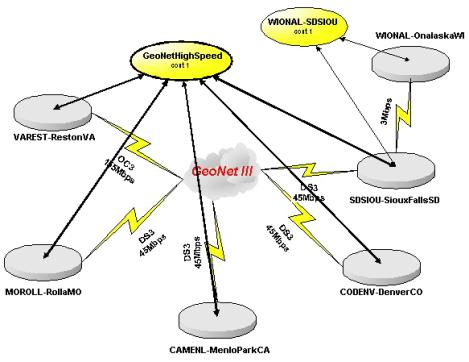
It
is important to note that with the current USGS GEONET3, our WAN links are fast
enough that all of the six locations could be considered a single Active
Directory Site, but the six Sites were created for future flexibility in
assigning “campus-wide” Group Policies (for Sites like Denver and Reston, where
there are multiple disciplines in each campus).
At
least one Domain Controller (DC) was placed into each Site. DC placements and special roles performed by
these controllers are as follows:
|
Location |
Domain |
Server Name |
Global Catalog |
FSMO Roles |
|
Reston |
adtest.doi.gov |
VAREST01 |
Yes |
Schema Master Domain Naming Master |
|
Reston |
adtest.doi.gov |
VAREST02 |
No |
PDC Emulator RID Master Infrastructure Master |
|
Reston |
adtest.usgs.gov |
VAREST04 |
Yes |
None |
|
Denver |
adtest.usgs.gov |
CODENV01 |
No |
PDC Emulator RID Master Infrastructure Master |
|
Denver |
adtest.usgs.gov |
CODENV02 |
Yes |
None |
|
Rolla |
adtest.usgs.gov |
MOROLL01 |
Yes |
None |
|
Menlo Park |
adtest.usgs.gov |
CAMENL01 |
Yes |
None |
|
Sioux Falls |
adtest.usgs.gov |
SDSIOU01 |
Yes |
None |
|
Onalaska |
adtest.usgs.gov |
WIONAL01 |
Yes |
None |
As
with Windows NT 4, in Windows 2000 each DC holds a replica of all information
in the domain it services. A new
feature in Windows 2000 is the concept of multi-master replication: each DC is
capable of accepting changes and replicating those updates to the other DC’s in
the domain. This drastically reduces
the number of domain controllers required to service the domain, and lessens
the problems that could arise from the failure of a single DC – a new DC can be
installed in place of the failed DC, and it will receive a full copy of the
Active Directory information from the other Domain Controllers. Since all DC’s are able to replicate to each
other, it is also advisable to keep the number of DC’s small to reduce the
amount of WAN replication traffic. In addition,
it is recommended that every Site have a Domain Controller that acts as a
Global Catalog. Global Catalog servers
maintain a subset of attributes for all objects in the forest as well as a full
copy of the information of their own domain.
This allows directory searches that would normally require WAN access
(like searching for users in other domains) to be performed locally at the
Site, increasing response times and cutting down on WAN traffic.
Logical
Design:
New
to Windows 2000 is the concept of Organizational Units (OU’s). OU’s can be created to organize the users,
computers, printers, etc., that are in the Active Directory. Group Policies can be placed on OU’s for
automatic configuration of the objects inside the OU. OU’s can also be used to allow a very granular delegation of
administrative duties to users inside the OU.
For example, it is now possible in Windows 2000 to allow Helpdesk
personnel to only have permission to change user’s passwords, without being
able to change their group memberships or any other information. Likewise, it is also possible to allow a
user to have local administrative access on workstations in the user’s OU, but
not in someone else’s OU.
A
guiding principle of OU design is “wider is better,” meaning that having
several nested layers of OU’s is discouraged.
The reason for this is that whenever 1) a Windows 2000 machine is
started, or 2) a user logs in to the domain from a Windows 2000 machine, a set
of checks is made to see if there are any Group Policies that apply to the
machine or user. Local policies on the
machine are checked first, then Site policies, Domain policies, and finally OU
policies are checked for settings that need to be applied. If the user or machine exists several layers
down inside an OU structure, user login times and machine startup times can be
impacted.
It
was decided to have a top-level OU design based on a combination of the Site
the user is in as well as their Discipline (example, DenverCO-W for Water
Resources personnel in Denver). A
second OU called the “Full Admins” OU (example, DenverCO-W Full Admins) is
created, which starts an administrative hierarchy of OU’s and groups that allow
for a very granular delegation of authority inside the Site-Discipline OU, as
shown below.
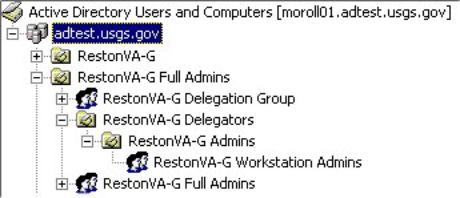
When
this structure is created, someone designated as a Full Admin for their OU has
full administrative authority for all objects in their OU – they can create and
delete users, add workstations to the domain, put up new member servers, add
subordinate OU’s, etc. The only
administrative tasks that cannot be performed by Local Administrators are those
that can have a domain or enterprise-wide impact, such as creating trusts
between domains or changing the minimum length of passwords. These tasks would still need to be performed
by a small, centralized team of Domain Administrators.
Again,
it is important to note that every DC will maintain a full copy of all OU
structures and changes that are made to them.
Because of this, Local Administrators will need to understand that DC’s
are to be treated as Bureau resources.
In fact, Local Administrators will not need to physically log in to any
of the DC’s to perform their administrative tasks – Local Administrators can perform
changes to their OU from any Windows 2000 computer in the forest through the
Active Directory Users and Computers console.
1. DNS Configuration
Active Directory is heavily dependent on
a proper DNS configuration in order to perform correctly. AD requires the use of DNS servers that support
the use of Resource Records to store additional information, such as Kerberos
and Site information. It was also very
important that the DNS structure created to support the Active Directory be
able to interoperate with the existing BIND DNS servers throughout the Survey.
It was decided that every Domain
Controller would also function as a DNS server. This was done to allow Sites to still have DNS and AD
functionality if their WAN link to other Sites was ever severed – the DC would be
able to fall back to its own copy of the DNS information and still service
clients.
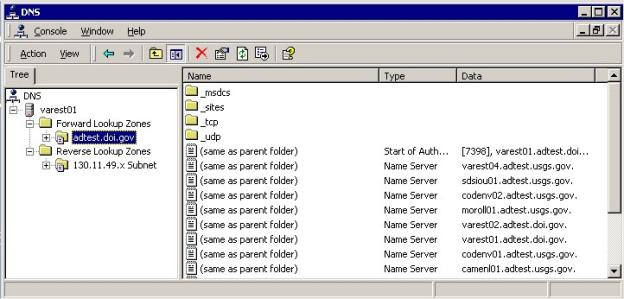
The adtest.doi.gov servers were
configured to host their own DNS domain, as well as a Reverse Lookup Zone for
those servers. These zones are
configured as Active Directory Integrated Zones, meaning that there is no
separate zone file containing the DNS information – the information is
contained directly inside the Active Directory, so DNS updates occur as normal
AD updates. The servers are configured
to allow normal Zone Transfers, but only to the other Domain Controllers (which
are DNS servers) in the forest.
Scavenging of stale resource records is also configured on these
zones. The adtest.doi.gov servers were
also configured to forward requests that they are not authoritative for the
adtest.usgs.gov DNS servers.
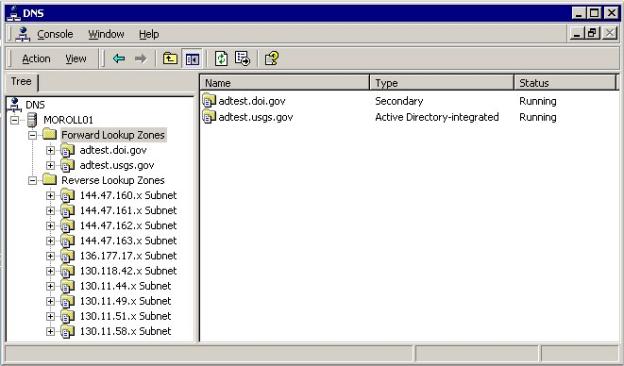
The adtest.usgs.gov servers are
configured similarly to the adtest.doi.gov servers. They host their own Active Directory Integrated Forward and
Reverse Lookup Zones for the adtest.usgs.gov domain, allow Zone Transfers to
the DNS servers in the Forest, and perform scavenging of stale resource
records. The adtest.usgs.gov DNS
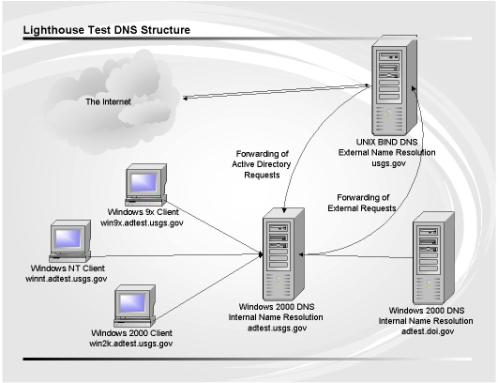
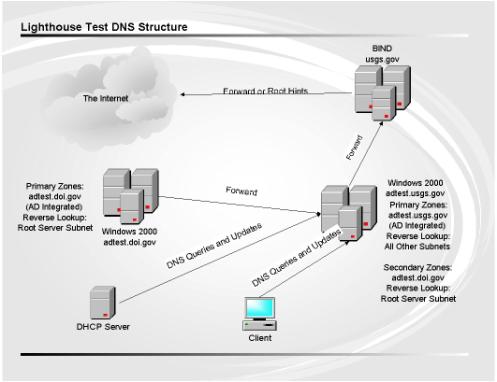
servers also hold Secondary Zones of the adtest.doi.gov DNS information. These DNS servers are configured to forward
requests that they are not authoritative for to the current USGS BIND DNS
servers. The USGS BIND servers are also
configured to host the adtest.usgs.gov zone, and forward all requests for that
zone to the Windows 2000 adtest.usgs.gov servers for resolution. In this configuration, it is not required to
have clients pointing to the Windows 2000 DNS servers for name resolution, but
it is recommended.
Both the
adtest.doi.gov and adtest.usgs.gov servers also act as caching DNS servers for
requests that they have forwarded to the BIND servers. The following
pictures summarize the above information and show how the overall DNS picture
works.
2. WINS Configuration
While Windows 2000 itself does not require the use of WINS for
name resolution, it is still required to support the down-level Windows NT and
Windows 9x clients in the survey, as well as for interoperability with UNIX
machines running Samba. Rather than
having several individual Site WINS servers performing Push/Pull Replication
with each other, it was decided to have a central WINS structure for the entire
Forest. There are only 2 WINS servers
in our test network (varest01.adtest.doi.gov and camenl01.adtest.usgs.gov), and
they are configured to perform Push/Pull Replication with each other. This has the effect of creating a
consolidated picture of all machines in the adtestusgs domain. The central WINS design also requires that
there can be no duplication of hostnames inside a domain. In order to be able
to differentiate what machines in this consolidated view belong to what Site,
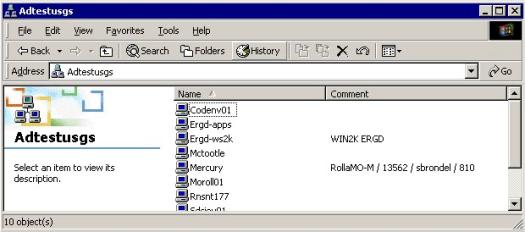
the Site name can be placed in the Description field of each workstation, in
addition to any information required by the Site. This information can be viewed from the Details view of Network
Neighborhood / My Network Places:
3. Domain Controller Configuration
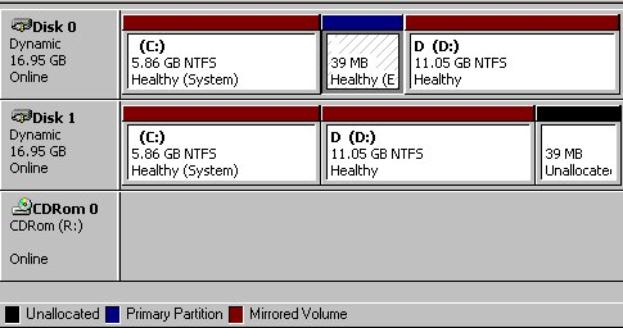
The test environment consisted of 9
Compaq Proliant Servers, configured with a single 733MHz Pentium III Processor,
256MB RAM, and 2 18GB SCSI hard drives.
In order to cut costs on the test servers, these systems were purchased
without hardware RAID capabilities.
Instead, the disks on these systems were configured as Windows 2000
Dynamic Disks and software mirroring was performed on them for redundancy:
4. Naming Conventions
In order to achieve a consistent way of
naming the many various objects inside the Active Directory, some
standardization of naming conventions were necessary. For easy searching of objects, it was decided that the names of
most objects would be based off of the Site the object exists in.
a) Sites - Full city name (without spaces)
plus state abbreviation (for example, SiouxFallsSD)
b) Domain Controllers - Hostname for Domain
Controllers are based off of the Active Directory Site they are placed in. Hostnames will consist of two letters for
the State and the first four letters of the City, plus a two-digit number. The full name includes the name of the
domain the DC services (for example, varest04.adtest.usgs.gov)
c) Member Servers - In order to minimize the
affect of Domain Migrations on end users, existing member servers will be able
to keep their current name as long as that name is not already in use. Local administrators should check with the
central AD team to see if a desired hostname is available. Local
administrators should also include the top-level OU name the server is a member
of, in the Description field of the member server. Also, member servers should
not follow the convention of Domain Controllers, so that DC’s can be easily
identified.
d) Organizational Units – Top-level OU’s
will be named after the site they fall in, plus discipline letter
(MenloParkCA-M, BaltimoreMD-W). The
“Full Admins” OU structure will be consistent for all Sites; however, the Full
Admins for an OU can create whatever OU hierarchy they would like inside their
“Site+Discipline” OU.
e) Workstations – In
order to minimize the affect of Domain Migrations on end users, existing
workstations will be able to keep their current name as long as that name is
not already in use. Local administrator should check with central AD team to
see if desired hostnames are available.
Local administrators should also include the top-level OU name the
workstation is a member of in the Description field of the workstation.
f) Published Shared Folders – 3 to 5
meaningful keywords for performing searches
g) Printers
– For published printers, use Site prefix, hyphen, discipline, hyphen,
room number (ex.
OnalaskaWI-B-130). For printers
that will not be published in the Active Directory, use whatever printing
convention is currently used at the Site.
h) Groups - Site prefix, hyphen, discipline,
plus group descriptor (ex. DenverCO-W
Oracle Developers)
i) Login Scripts – Site prefix, hyphen, discipline, hyphen, and descriptor/number
(ex. RollaMO-M-1.bat)
j) Users – use Domino username for username,
with User Principal Name set to username@usgs.gov .
k) Domains
i.
Root –
adtest.doi.gov, NetBIOS name adtestdoi
ii.
User –
adtest.usgs.gov, NetBIOS name adtestusgs
5. Policies for Administration and
Functionality
New to Windows
2000 is the concept of Group Policies, which are configurable templates that
can be used to perform many different tasks on Windows 2000 clients, such as
automatic software installation, configuration of desktop settings, and setting
of security policies. Group Policies
can be applied on Organizational Units, Sites, or the Domain itself. However, Group Policies do not flow between
the different Domains in a Tree or Forest.
Several
security-related Group Policies were set at the Domain level and on the Domain
Controllers OU. These set things such
as auditing policies, event log sizes and retention lengths, password policies,
and the use of IPSec encryption among Domain Controllers. For more information on these policies,
please refer to the Security Team Report.
For every
top-level OU that is created, ten generic Group Policies are created. These policies are not initially linked to
any OU, but are available for a Local Full Admin to modify as desired. Only Domain Administrators can actually
create new Group Policies, so if any Local Full Admins use up their initial ten
they can contact the central Domain Administrators to have more created for
them.
Identified
Issues/Problems:
·
When camenl01 was promoted to a Domain Controller, it gave
several errors in the event logs and was unable to replicate any information to
other domain controllers. Further
investigation showed that when camenl01 was brought online, its network
configuration contained a different subnet mask than the subnet information
that was used to create the MenloParkCA Site.
Camenl01 then found itself unable to match the subnet information for
any Site in the Active Directory, and was thus unable to receive any
updates. Normally, camenl01 would have
appeared in the Default-First-Site-Name Site in this case, but that Site had
been renamed to create the initial RestonVA Site. The subnet information for the MenloParkCA site was corrected,
and a new Default-First-Site-Name Site was created to avoid the problem in the
future.
·
Occasionally when rebooting a Windows 2000 Server remotely
through Terminal Services, the machine doesn’t Restart but performs a normal
Shutdown instead. A Hotfix was received
from Microsoft, and will be incorporated into Service Pack 2.
·
During our MMS testing, a replication error occurred which
caused varest04 to no longer be able to process updates from other DC’s, even
though it was able to propagate changes to the other DC’s. Varest04 had to be de-promoted back to a
member server and re-promoted to a Domain Controller to fix the issue. A Hotfix was obtained from Microsoft to keep
the problem from occurring again, and will be incorporated into Service Pack 2.
·
One of the top-level Domain policies displays a login
security warning to Windows 2000 clients.
It was determined that whenever a comma occurs in the warning text, any
spaces or null characters immediately following the space are “deleted” and not
shown. Microsoft has confirmed that
this has been fixed in Windows XP, but as of this writing we have no
workarounds or hotfixes to correct the issue for Windows 2000.
·
Because the DNS names of both our Root and USGS domains
start with “adtest”, there is likely to be confusion when a user goes to
perform a search of the Active Directory and sees the following screen:
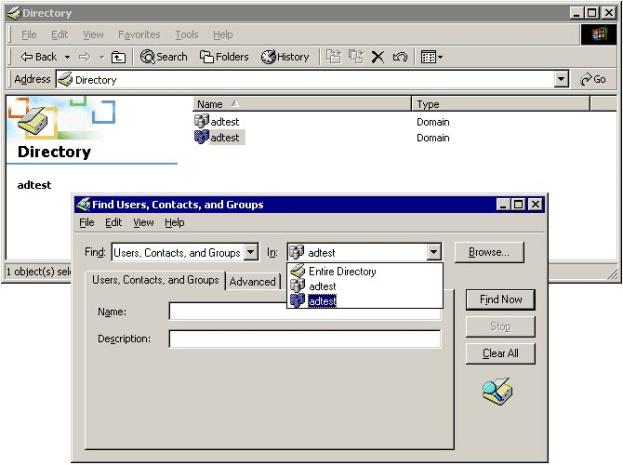
Therefore,
in a production Directory, the names of the Domains should be changed to make
Directory searches easier, at the possible cost of redundancy in the name (for
example, adusgs.usgs.gov)
Recommendations:
Use the current test structure and layout
as the basis for a full production implementation of Active Directory for the
USGS.
Members: Jay Schwegmann (Chair), Sam Martinez, Brian
Rood
Team
Objectives: Establish hardware and
software standards for Windows 2000 Professional and Server.
Scope of
Test: Configure and test
Windows 2000 Server/Professional.
(Note: this test makes no differentiation between Windows 2000 Server
and Advanced Server.)
Description
of the Tests Performed:
Windows 2000 Professional:
Loaded Windows 2000 SP1 and
installed various hot fixes per instructions in Scott Brondel’s configuration
guide. Tested system stability and a
variety of user accounts for access to both the local machine and the
domain. Tested standard office
automation software such as MS Office, various anti-virus software solutions,
X-windows emulation software and ARC/GIS software.
Windows 2000 Server:
Loaded Windows 2000 Server
SP1 with various hot fixes onto single drive utilizing Windows 2000 software
mirroring capabilities. Primary domain
controller(s) were configured in Reston and high-level Active Directory
components were setup (sites, replication, upper-level OU’s, security.) Established IP/Sec connectivity between
domain controllers and established a replication schedule. Established administration policies and procedures.
Workstation
Upgrade/Migration:
Performed an in-place upgrade
from Windows NT workstation 4.0 to Windows 2000 Professional. Also performed in-place upgrade from Windows
98 SE to Windows 2000 Professional.
Test Results:
Windows
2000 Professional:
Sample machines:
|
Dell Optiplex GXi |
Dell Dimension |
“Clone” PC |
|
550 Mhz
PIII 256MB RAM 10GB Hard
drive |
400 Mhz
PII 128MB Ram 6GB Hard
drive |
Dual
350Mhz PII 256 MB RAM 2 4GB Hard
drives |
|
Configured
as “Administrators” workstation |
Configured
as standard office workstation |
Configured
as ARC/GIS workstation |
· OS
loaded with SP1 on all test machines (see notes
below)
· Hot
fixes were applied successfully
· Software
tested worked without incident
· Overall
stability rated as good
Test
Recommendations:
Windows
2000 Professional is not particularly CPU intensive when used in a traditional
“office automation” role. The Dell
Dimension workstation used in the testing was configured as a typical
workstation. Although purchased in
early 1999 with a 400Mhz PII Intel CPU and only 128MB of RAM, the system
performed adequately. The GXi configured as the “Administrator’s workstation”
did on occasion run close to it’s memory threshold while the “clone” dual
350Mhz system running GIS software routinely ran the software without
difficulty.
As
is the case with most operating systems the most significant limitation is the
amount of physical RAM in the workstation.
Applications such as IE, Lotus Notes and the Microsoft Office 2000 and
Office XP suite, when running in parallel, consume vast amounts of physical
RAM.
Recommended Configurations
|
Admin
Workstation |
700Mhz-1.5Ghz
PIII/IV 256-384MB
RAM 20GB drive |
|
GIS |
800Mhz –
1.5Ghz PIII/IV 256-512MB
RAM 30GB drive |
|
Office
Automation |
500Mhz-800Mhz
PIII 256MB RAM 10GB drive |
Test Results:
Windows
2000 Server:
Sample machines:
|
Compaq Proliant ML370 |
“Clone” single CPU |
“Clone” dual CPU |
|
733Mhz
PIII 256MB
PC133 RAM 2 UW 18GB SCSI drives Software
mirroring |
700Mhz
PIII 256MB
PC133 RAM 1 4GB ATA
IDE 1 30GB ATA
IDE |
2 633Mhz
PIII 512MB
PC133 RAM 1 LDV 9GB
SCSI drive (tested
w/o RAID5 array) |
· OS
loaded with SP1 on all test machines
· Hot
fixes were applied successfully
·
Tested configurations had good stability
Test
Recommendations:
Windows
2000 Server/Advanced Server requires at least a single 500Mhz CPU and 256MB RAM
to function. Fast SCSI drives and RAID
arrays are also a necessity if high performance is required. Generally, for a typical Windows 2000 Server
in a traditional file-sharing role, the specifications above will suffice. However if the server’s role is to be a
Terminal Server, Application Server or Database Server, the specifications
should be scaled up accordingly, with two or even four CPUs running at 1Ghz or
higher and up to 2GB RAM (4GB RAM if supported) and fast-wide SCSI drives in
RAID5 configuration, and a quality array controller with enough cache.
Recommended Configurations
|
Domain
Controller |
Single or
dual 700Mhz-1.5Ghz PIII/4 CPUs 512MB-1GB
RAM 2 mirrored
9GB SCSI drives for OS 3-5 36GB
SCSI drives RAID5 |
|
File/share
server |
800Mhz –
1.5Ghz PIII/IV 512MB RAM 2 mirrored
9GB SCSI drives for OS 7-12+ 36GB
SCSI drives RAID5 |
|
Terminal
Server Database
Server Application
Server |
Dual or
quad 1Ghz – 1.5Ghz P4 CPUs 1-4GB RAM 2 mirrored
9GB SCSI drives for OS 7-12+ 36GB
SCSI drives RAID5 |
The
tested configuration (Compaq Proliant ML370) was adequate for the relatively
light load the server was under. Under
higher load, with more users and an assumption that this load will increase
over time, “over engineering” the servers is not considered unwise.
Test Results:
Windows
2000 Upgrade/Migration:
The
in-place migration from Windows NT Workstation 4.0 to Windows 2000 Professional
was successful. The upgrade is a simple
process, assuming your original NT installation is stable, and no significant
customization was done to the NT system.
The test machine used, a Dell Optiplex Gx1, is fairly representative of
PCs used in the USGS. The upgrade
leaves the directory structure, installed applications, and to some degree, the
profiles as they were under NT 4.0. On
our test PC there was some confusion about the location of profiles under
Windows 2000 vs. Windows NT.
The
upgrade from Windows 98SE was also successful, however the overall stability of
the system was questionable. Many
changes to the registry occur with this scenario, and it is believed that this
was the cause of the instability. We
observed slow application start times, corrupted applications and an overall
performance degradation as compared to a fresh installation of Windows 2000
Professional. The actual applications
that were corrupted changed from one upgrade to the next, however we saw a
significant failure rate with Lotus Notes client, the Arc/View and Arc/Info applications
(which perform poorly under Windows 9x anyway) and the Adobe family of
products.
Identified
Issues/Problems:
Problem: Incorrectly
configured DNS
Recommendation:
Have DNS information checked prior to installation
Note: On one system, a Micron Millennia Max SE440BX Windows 2000
SP1 overwrote the ultra ATA IDE drivers rendering a 30GB IDE drive unavailable
(it only showed 8GB.) This is due to
the fact the Microsoft mini-ATA driver is loaded from the service pack and not
the vendor specific ATA driver for the system.
No other Millennia Max SE440BX system was available to replicate this
problem on, however.
Team Recommendations:
The Desktop/Server team recommends the
following minimum hardware configurations:
|
Windows 2000 Professional |
500Mhz CPU 256MB RAM 10GB disk drive |
|
Windows 2000 Server (Basic) |
700Mhz CPU 512MB RAM Mirrored OS drives/RAID5 storage |
|
Windows 2000 Server (Advanced) |
Dual/Quad 1Ghz CPU 1-2GB RAM Mirrored OS drives/RAID5 storage |
The team makes no recommendations on particular brands of servers
(such as Compaq, HP or Dell.) These
recommendations are simply the minimum hardware requirements for Windows 2000
Professional/Server.
Members: Sam Martinez (Chair), Ed Brown, Brian Rood
Team Objectives:
Scope of Test:
Test and Establish Migration Strategies for individual NT 4.0 Domain
migrations using commercial Windows 2000 migration software such as NetIQ DMA
and FastLane DM/Manager. Migration
testing requires that applications currently used in the NT 4.0 environment
will function properly in the Windows 2000 Active Directory environment. Both Terminal Services and IIS support
documentation have been created on-line at http://nttac.usgs.gov/nt_tac
Description of the
Tests Performed:
Although
Microsoft provides a free NT Domain migration that can be downloaded, we
decided not to use this product based on recommendations from both Microsoft
and Compaq. The Microsoft product lacks
most features found in third-party packages that allow for the transfer of both
the password and security identifier information from the NT 4.0 environment.
The migration products tested were NetIQ DMA and FastLane DM/Manager. The
actual process required for migration went as follows:
· Configure the NT 4.0 Server TCP/IP
properties to use the Windows 2000 WINS address – This is important since
Windows NT 4.0 relies primarily on NetBIOS name resolution in order to
determine Domain Controllers and computer names.
This team utilized several existing USGS
resources created and maintained by the USGS Water Resources Discipline, NT
Technical Advisory Committee (NT TAC) for product research and basic
information. A great deal of expertise
and research went into the creation of the following resources and we would
like to express our gratitude for this information. A special thanks is expressed to Tony Bouret for his
contributions to creation and support of the NT TAC web pages. Listed below is information maintained by
the NT TAC:
Test
Results:
Identified Issues:
Recommendation:
FastLane DM/Manager is the recommended NT 4.0 migration product based on
our tests but further testing of other NT 4.0 migration products may be
performed as newer and better products are released. Close integration of the Active Directory Management Team with
the NT Technical Advisory Committee would be advantageous to the bureau since
the NT TAC group has documented much of this information at http://nttac.usgs.gov/nt_tac.
Members:
Michael Kandrac (Chair), Scott Brondel, and Larry McIrvin
Team
Objectives: Determine
optimum pilot configurations and testing scenarios for Windows Internet Naming
Service (WINS), Dynamic Host Configuration
Protocol (DHCP), and Domain Name Service (DNS).
Scope
of Test: Pilot
compatibility with current USGS production environment of no WINS servers, a
test DHCP environment, and DNS Unix Bind 4.9.7.
Description
of the Tests Performed:
1. WINS: A centralized primary WINS server was
configured on VAREST01 and a secondary on CAMENL01. An excellent explanation and complete description of how WINS was
configured is contained in the Active
Directory Design / Central Administration Team report under ‘Description of the tests performed’, # 3,
WINS Configuration.
Test: If a WINS address (which will be required
for Win9x/WinNT clients of the Active Directory) is automatically provided to
all of the current clients of the UNIX-based DHCP in Reston, will there be any
ill effects on the clients which do not use WINS (thus UNIX and Macintosh
clients)? Proposed testing: The UNIX
DHCP server will be configured with a WINS scope option of 130.11.49.206 as
primary and 130.118.42.50 as secondary for one day (Option NetBIOS-name-servers
130.11.49.206, 130.118.42.50). If
successful: there will be no reports of problems with existing clients,
regardless of platform, that can be traced to the WINS option as the
cause. If unsuccessful: the WINS options
will be removed, and the WINS addresses will have to be entered manually for
the Active Directory clients in Reston.
2. DHCP: At the USGS National Center in Reston, a
Windows 2000 DHCP was configured using a different address space (scope or
range) than that configured for the production UNIX Bind DNS. Thus two DHCP servers were simultaneously
active, both issuing IP addresses on a first found basis. This means a client requesting a DHCP IP
address would receive one from the first DHCP server that responded.
The address
space 130.11.35.1 to 130.11.35.254 is now being served by Windows DHCP with the
following scope options:
Router:
130.11.48.1, 130.11.48.6
DNS Servers:
130.11.48.2, 130.118.4.2, 136.177.16.3
DNS Domain Name: er.usgs.gov
WINS/NBNS Servers:
130.11.49.206, 130.118.42.50
Also, the UNIX DHCP server would provide WINS server
information of WINS/NBNS Servers: 130.11.49.206, 130.118.42.50
The actual test
format was:
Day 1 - Turn on Windows DHCP, UNIX DHCP unchanged
Day 2 - UNIX DHCP starts providing WINS addresses
Day 3 - UNIX DHCP returns to normal, Windows DHCP starts
providing
WINS
addresses
Day 4 - Both DHCP servers provide WINS addresses
Day 5 -
Windows DHCP shut off, UNIX DHCP reverts to pre-test status
3. DNS: (adtest.usgs.gov & adtest.doi.gov)
An excellent
explanation and complete description of how DNS was configured is contained in
the Active Directory Design / Central
Administration Team report under ‘Description
of the tests performed’, # 2, DNS Configuration.
Test A: Can a Windows 2000 client
successfully access, become a member, and administer a Windows 2000 Active
Directory without using a Microsoft DNS server as its primary DNS server? Proposed testing: A Windows 2000 Professional
client will be installed, with the primary and secondary DNS servers pointing
to the current UNIX BIND DNS servers.
Attempts will be made to attach the machine to the current Lighthouse
Active Directory in testing. Response
time will also be compared to that of running with Microsoft DNS server IP's.
If successful: further tests (location of resources, management of those
resources, etc.) will be made to assure that the same functionality is present
on the client using BIND for DNS as compared to the Microsoft DNS running in
the Lighthouse Project.
If unsuccessful:
a second Windows 2000 Professional client will be installed using BIND DNS for
the primary DNS IP and the Microsoft DNS as the secondary DNS IP. The same tests will be performed as well.
Test B: Install the Unix based DDNS (Bind v.9) allowing
updates from the IP of the ADS server.
Install the ADS and verify that it updates the Unix DDNS. If successful, the ADS structure will be
pushed to the domain server updating the Unix DDNS. This would prove that our
target Unix based DDNS environment would fully support a DDNS integrated ADS
environment.
4. BANDWIDTH:
Test A: Disconnect a Domain Controller (DC), test
the authentication process, and study the consequences of backlogged replication.
i.e. If login information is cached, are domain resources
still accessible?
Test B: Establish traffic baselines and note effects of replication on bandwidth
traffic. A “sniffer” was setup on
Varest04 to measure normal replication traffic for 3 hours. Later it was setup again to measure a
forced, higher than normal replication traffic by deleting 12,000 AD names (and
then, of course, adding them back in).
Test
Results:
WINS: Test was judged successful. The test ran for five days without incident,
there were no problem calls to either the USGS Help Desk or Jim Fisher, USGS
DNS administrator.
DHCP: Test was judged successful. Test ran for five days without reported
incident, no problem calls to either the USGS Help Desk or Jim Fisher, USGS DNS
administrator.
DNS:
Test A: Test was judged successful with performance
slightly slower but negligible.
Test B: Test
was judged successful. Installed the ADS and verified the
Unix DDNS was updated. The ADS structure
was pushed to the domain server without any subsequent problems. Additionally, both a Windows 2000 Advanced
server and a Professional workstation were added to the ADS tree to verify that
the Unix DDNS was updated.
As of March 28, 2001, ISC has released Bind 9 (DDNS) as
a full-release.
BANDWIDTH:
Test A: Test was judged successful when the VAREST04
was cut off from the WAN for 2 days and it subsequently picked up the
replication updates as soon as it got re-connected.
Test B: Network
traffic under normal situations is considered inconsequential. “Sniffer” results are:
Start Time 4/10/2001
1:52 PM
Duration 2:11:49.358 (2 hrs, 11 mins)
Total Bytes 6858794
Total Packets 38238
Bytes/Sec 867
Packets/Sec 4
Average Utilization 0%
Line
Speed 10 mbs
Network traffic
under a first of two fabricated heavy replications is considered
inconsequential. Approximately 12,000
name records of about 7 fields each were created and then replicated over the
WAN to VAREST04. “Sniffer” results are:
Start Time
4/18/2001 9:14 AM
Duration 3:17:52:862
(3 hrs, 17 mins)
Total Bytes 7422665
Total Packets 24126
Bytes/Sec 625
Packets/Sec 2
Average Utilization 0%
Line
Speed 10 mbs
Network traffic
under the second of two fabricated heavy replications is considered
inconsequential. Approximately 12,000
name records were deleted and then replicated over the WAN to VAREST04. “Sniffer” results are:
Start Time
4/18/2001 1:35 PM
Duration 0:47:34.048
(47 mins, 34 secs)
Total Bytes 7877260
Total Packets 12739
Bytes/Sec 2760
Packets/Sec 4
Average Utilization 0%
Line
Speed 10 mbs
Identified
Issues and Problems:
WINS:
None
DHCP:
None. Even though during the
tests there were no “reported” problems to the National Center Help desk or
DHCP manager, we “heard” of DHCP problems from WRD. We have not been able to verify the cause, but suspect that
running two DHCPs simultaneously may be culprit and not either the Unix or the
Windows 2000 individually. The DHCP
tests were run again
on Tuesday 4/16
successfully with WRD able to receive DHCP addresses.
DNS:
None. In configuring the DNS,
the ability to have zone transfers to any server is denied because this
represents a security vulnerability discovered by a security scan/probe.
BANDWIDTH:
None.
Team
Recommendations:
WINS:
A centralized
environment with a primary (placed on the same machine as the DNS server) and a
secondary server.
DHCP:
A DHCP server at each of
the 6 major sites on their domain controller.
DNS: Active Directory Integrated Zones on
all Domain Controllers and forward everything else (UNIX, Mac, NetWare,
Macintoshes,) to the current BIND 4.9.7 DNS, soon to be BIND 8.2.
BANDWIDTH:
Network traffic for replication will not be a concern or cause adverse
effects to the current network infrastructure.
Members: Ed Brown (Chair), Scott Brondel
Team
objectives: To demonstrate if remote
computing utilizing USGS based Windows 2000 AD services is viable via several
access methods. These features are
critical to providing a cohesive telecommuting capability to USGS staff.
Scope of
Test: Demonstrate that VPN and
Remote Access Services are available in a test environment, and applicable to a
production deployment.
Description
of the Tests Performed:
Set up a stand-alone Windows
2000 server to run access trials on.
Since the software utilized for testing (ATT WinVNC) was non-securable,
this system was isolated from USGS networks for the bulk of testing.
Test Results:
***
This was an abbreviated test for proof of concept. A comprehensive 90-day pilot test of VPN access will be conducted
by the bureau Remote Access Team sometime during the period of June 1 to
September 30. This bureau test will
utilize a wide variety of computer equipment, computer software, and access
technologies. Further Windows 2000 AD
testing will be done as a component of the larger test. Since this testing will be developing a
bureau standard for access, recommendations for equipment and software will not
be made in this report.
Identified
Issues:
Issue: Access to the USGS Win2000 systems was not
tested through any of the site-specific firewalls.
Recommendation: A complete test of all remote access
functions will be conducted during the bureau VPN testing period.
Team Recommendations: Remote access to Windows 2000
AD services is a viable component of the telecommuting infrastructure. Due to upcoming bureau level VPN access
tests, further action on this item will be dependant on the new resources
acquired by the bureau.
Team Members: Roy McCullough
(Chair), Mike Kandrac, Mike McTootle
USGS Bureau
Security personnel Don Watson and Maryjon McAvery provided input and review for
the team. Thanks and appreciation also
goes to the full Lighthouse team in general, and Scott Brondel in particular,
for their assistance.
Team Objectives:
Scope: The team’s scope was to help build an
infrastructure with the proper balance of security, performance and usability.
Research Findings:
Security
Requirements
o
Intel
Pro/100S Server Adapter 10/100 -- $85 via vendor at pricewatch.com
o
Fully
equivalent cards are acceptable.
Security-related
group policies as implemented
ADTEST USGS
POLICY
Windows
Settings>Security Settings>Local Policies>Audit Policy
Windows
Settings>Security Settings>Local Policies>Security Options
o
No
access without explicit anonymous permissions (if too restrictive, can
downgrade to "Do not allow enumeration of SAM accounts and shares")
o
This is a Department of the Interior
computer system. Department of the
Interior computer systems are provided for the processing of Official
Unclassified U.S. Government information only.
All data contained on Department of the Interior computer systems is
owned by the Department of the Interior and may be monitored, intercepted,
recorded, read, copied, or disclosed in any lawful manner, by authorized
personnel. USERS HAVE NO REASONABLE
EXPECTATION OF PRIVACY IN THE USE OF THIS SYSTEM. Unauthorized access or improper use of Department of the Interior
computer systems may subject violators to criminal, civil, and / or
disciplinary action up to removal from Federal service pursuant to Federal and
State laws and regulations and Department of the Interior policy. Continued use of this computer, and any
attached system, indicates awareness of and consent to the terms of this
statement.
Windows
Settings>Security Settings>Account Policies>Password Policy
Windows
Settings>Security Settings>Account Policies>Account Lockout Policy
Windows
Settings>Security Settings>IP Security policies on Active Directory
Windows
Settings>Security Settings>Event Log>Settings for Event Logs
Default Domain
Controller Policy
Computer
Configuration>Windows Settings>Security Settings>Local
Policies>Security Options
Computer Configuration>Windows Settings>Security
Settings>IP Security Policies
IPSec
IPSec
capabilities are built into Windows 2000.
In this project, all Domain Controllers have been configured, via Group
Policy settings, to require encryption for communications between them. The chosen encryption algorithm is Triple
DES (3DES). The related integrity
algorithm chosen is SHA1 (Secure Hash Algorithm).
Before a server
can become a domain controller, two things must first be done to facilitate
IPSec communications:
Single
sign-on and token-based authentication
“Single sign-on” is sometimes referred to as “the holy grail” of
security. There are various ways of
thinking of the concept of single sign-on.
Here
is what single sign-on will mean in an Active Directory environment. First, the good news: consolidating numerous
existing Windows domains into one forest-wide domain will allow all Windows
users to be known and recognized, with all appropriate permissions throughout
the domain. For Microsoft-oriented
resources, this is very good.
For applications such as Lotus Notes, things get more
interesting. Windows makes use of an
entity called the GINA (Graphical Identification and
Authentication). Unfortunately, the
GINA supplied with Windows can only be used with Windows. Third-party vendors such as Novell and Lotus
have written their own versions of the GINA allowing their own applications
(Novell’s Netware or Lotus’ Notes/Domino, respectively), to share user
authentication credentials. It is
beyond the scope of this project to attempt to create a new GINA, though
technically, it is possible to create a unique USGS version of the msgina.dll
module. There are, of course, still
many more applications and systems, such as Time & Attendance, as well as
mainframe access to FFS (Federal Financial System), all of which would still
require the manual entry of user credentials.
In the area of UNIX systems, it is possible,
through shadow accounts, to effect single sign-on. Kerberos-authentication is possible, but would require extensive
configuration and testing. This could
be investigated further if the need is strong enough.
It is likely that the USGS will always have a
disparate computing environment.
Scientists will always have unique computing requirements that do not or
cannot necessarily run on a Microsoft platform. Additionally, unless there is some top/down management mandate,
all USGS owners of hardware running Microsoft operating systems cannot be
counted on to join the one Windows 2000 Active Directory domain. Scientists will thus not be able to reap the
full benefits of single sign-on, as herein defined.
There are vendors in the marketplace
offering single sign-on solutions, where various disparate userids and
passwords are stored for use on different systems, somewhat like keeping one’s
key chain of keys in a safe. That
“safe” then becomes the weakest link in the chain. This type of single sign-on solution is beyond the scope of this
project.
Smart card technology is a promising
up-and-coming technology for user authentication. This discussion will be limited to smart cards and no other
token-type support (such as Secure-ID key fobs). Windows 2000 comes with built-in support for smart cards. The Microsoft Knowledge Base article Q257480
(HTML) has a very good discussion of this topic. Any authentication
technology beyond Ids and passwords means budgeting for additional hardware and
management of that hardware.
Firewall
Considerations
For all domain controllers and users…
These ports need to be open for both inbound and
outbound communication:
·
88 – Kerberos (TCP and UDP)
·
137 – NetBIOS Name Service (TCP and UDP)
·
138 – NetBIOS Datagram Service (UDP)
·
139 – NetBIOS Session Service (TCP)
·
500 – Internet Key Exchange (IPSec) (UDP)
·
3389 – Terminal Server (UDP)
·
636 – LDAP SSL
·
3268 – Global Catalog LDAP
·
3269 – Global Catalog LDAP SSL
Note that NetBIOS needs to be available to
support pre-Windows 2000 clients, which are not IPSec capable.
These
protocols need to be open:
RAS/RADIUS
The USGS
Computer and Network Security Handbook, Section 7.4, Remote Systems
Administration, states:
There are
multiple techniques available for remote administration for Windows 2000. Among options available are:
Some miscellaneous findings:
Due to separate,
ongoing enterprise-level remote access research efforts and time constraints,
RADIUS (Remote Authentication Dial-In Service) options were not investigated.
OU
Authorizations & Permissions
The full
Lighthouse team discussed this topic.
The following model for OU’s and associated groups was chosen: (The Reston OU was used as an example.)
Contingency
Planning
If one or more
domain controllers should become disabled due to hardware or software problems,
the DC environment on the given machine(s) must be re-established. These two basic tasks must be achieved:
EFS File
Recovery
The Encrypting
File System (EFS) is a standard, built-in component of every copy of Windows
2000. A Certificate Authority (CA) must
be established at the domain controller level.
A user recovery agent account must be established to provide decryption
of user files if required by the owner or properly authorized authority. By default, this ability is present on
accounts of enterprise domain administrators.
Scanning
Results
On Wednesday,
March 14, 2001, the test domain controllers were scanned by special software
designed to probe for security vulnerabilities.
The scan
revealed:
Actions were
taken to address these identified vulnerabilities.
Scan
results after addressing vulnerabilities
On Monday, April
9, 2001, the test domain controllers were scanned again to probe for security
vulnerabilities.
The scan
revealed:
Five of the
above items are necessary services needed for UNIX interoperability. These five were all in reference to NFS
(Network File System). This includes
the superfluous NFS daemon, the NFS mount daemon operating on an unreserved
port, the NFS service, the RPC nlockmgr service, and Unix running NFS. The DNS, LDAP and ICMP-related items are
considered to be of a low security risk.
Regardless, efforts will be made to reduce or eliminate risk in these
areas. The Tribal Flood Network 2000
denial of service tool detection sparked much concern and discussion. After additional scans and analysis, it was
determined that the scan software, running in “heavy scan” mode, produced a
“false positive”.
Important:
Please note that not all of the “vulnerabilities” listed by the probe
software necessarily apply to the Microsoft environment.
Test Results:
The following items were among those
tested, specifically with an eye towards security:
Issues/Problems
To Be Investigated Further:
Recommendations:
Members: Larry McIrvin
(Chair), Scott Brondel and Mike Kandrac
Team objectives:
Naming standards of objects and attributes, Replication and schema
agreements and Object and attribute ownership issues.
Scope of Test: Configure and test
Meta-Directory products that are available.
Description of the Tests Performed:
A Windows 2000
server was setup as a single server in the Active Directory (AD) forest. The following products were installed on the
server, Lotus Domino 5.03, Novell NDS eDirectory 8.5 and dirXML. Users were created in Domino and propagated
to AD. Changes were made to users in
Domino and they were propagated to AD.
Because of the cost to purchase the license ($5.61 per person and the
price goes up on May 30, 2001) further testing on dirXML was not
performed. If DOI implements dirXML the
USGS would be covered with their license and using dirXML would be an option.
Microsoft
Metadirectory Services (MMS) was configured as follows:
An Advanced
Server member was added to the adtest.usgs.gov domain. MMS 2.2 was installed on the server and
configured to synchronize users from the Lotus Domino Address Book to the
adtest domain.
The following
fields were populated in AD:
Test Results:
The MMS Domino
Migration Agent (MA) imported 13,329 entries from the Notes Database into the
Metadirectory. The MMS Together
Administration Management Agent (TAMA) created 12,995 user objects in the AD
Connector Space. The MMS AD MA created
12,698 user accounts in the "adtest.usgs.gov" AD Domain.
All AD user
accounts were created under a top-level "MMS Test" Organizational
Unit (OU). Under "MMS Test",
MMS created a hierarchy of 23 OUs which mirror the Notes user structure. As the USGS design calls for, these user
accounts are all disabled and can be moved to other locations in the AD prior
to being enabled. These disabled
accounts do not have a password and passwords will have to be set prior to
enabling the accounts.
After
configuring "Attribute Flow Rules" for the Domino and AD MAs, MMS was
scheduled to run hourly to find new objects, and attribute changes. Events are scheduled from 5:00am EST through
9:00pm EST every day on an hourly basis.
The Domino MA runs on the hour, the TAMA runs at quarter-past, and the
AD MA runs on the half-hour.
We customized
several default MMS scripts to accomplish some field mapping rules that we had
previously defined. The MMS
configuration has been documented for the Domino, TAMA and AD MAs.
Identified Issues/Problems:
Problem: The Domino Directory has several hundred
user names that caused errors in the import process. Most of these user names are not real users and do not have
standard information in the fields.
Recommendation: A detailed log of these errors will need
to be created and each name checked to determine if it is a real user. If it
is, the problem will need to be resolved, hopefully by correcting the data in
Domino.
Problem: Changes made to the user field
information is not being propagated from the Metaverse to the AD for users that
have been moved to another container.
In an attempt to fix the problem of not finding moved users the AD
Migration agent script was changed.
This change caused the AD MA to start deleting OUs that it had not
created and the MMS AD MA had to be shutdown.
Recommendation: Microsoft Consulting Engineers have
recommended the following:
The biggest
obstacle to solving this problem is the fact that USGS does not have a
consistent identifying attribute in Notes. In AD, an Object’s ultimate
identifying attribute is the GUID, which allows you to change the alias or the
display names and still maintain consistency. Whenever you change an alias in
Notes, AD consider that as a new object because you are using the alias as the
identifying attribute. The solution is
to either create a constant attribute in Notes, which we can map to the GUID in
AD, or allow AD GUID to flow back into Notes and become the identifying
attribute.
Discussions with
the Lotus team have resulted in an agreement to populate the User ID, also
called the EmployeeID, field in Domino and let it flow to MMS. The Domino MA has been modified and tested
to bring this field into MMS. Modifying
the AD MA to connect the EmployeeID to the GUID will require help from the
Microsoft consulting engineers.
Since name
changes are a two-step manual process in Domino, no attempt was made to check
the name change propagation to AD. This
process will also work better using the EmployeeID field.
Critical things
that still needs to be done, but were outside the scope for this project:
Team Recommendations:
Procure two
servers with Windows 2000 Advanced Server operating system and MMS installed
and configured. The MMS software is
free, but a consultant will be required to install and configure the software.
Members: Michael McTootle (Chair), Scott
Brondel, Sam Martinez, and Roy McCullough
Team objectives:
Examine
and identify potential Microsoft Windows 2000 interoperability issues with
existing networks, servers, desktops, printers, data, and applications.
Scope:
Analyze and test the following Windows
2000 products that support Windows 2000 interoperability with Novell Netware,
Windows 2000/NT/9x, Macintosh, UNIX volumes, directories, directory map
objects, printers, and print queues.
Interoperability
Overview:
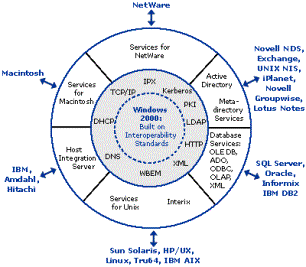
Interoperability
features and tools:
Description of the Test:
The interoperability tests evaluated cross
platform access to shared file and printer resources between Windows, Netware,
Macintosh, and UNIX. The test lab used
the following systems to evaluate, identify, and demonstrate the possible
Windows 2000 interoperability issues and solutions:
Interoperability Test Lab Systems:
GSNW
is server based and included with Windows 2000 Server. It requires
the NWLink IPX/SPX/NetBIOS Compatible Transport Protocol
(NWLink). GSNW allows Windows 2000
Servers to connect to NetWare 3.x , 4.x, and 5.x file and print resources through a single gateway account. The gateway allows client computers running
only the Microsoft client software to access shared NetWare file and printers.
Test
Results: Windows clients accessed and
attached to Netware shared files and printers through the GCNW account
successfully. Network security and
login scripts were managed by either Windows or Netware. GSNW
used the IPX protocol to interoperate with NetWare version 5.x. The IP protocol is not yet supported.
GSNW
Note: The Windows clients needing little access to
Netware resources will not have to install the NWLink protocol which will
reduce network traffic.
Test:
Client Services for Netware (CSNW)
CSNW is client
based and included with Windows 2000 Professional. It requires the NWLink IPX/SPX/NetBIOS Compatible
Transport Protocol (NWLink). CSNW allows Windows 2000 Professional clients to
make direct connections to NetWare 2.x, 3.x, 4.x, and 5.x file and printer resources.
Test
Results: Windows clients are able to directly
access and attach to Netware shared files and printers successfully. Network security and login scripts can be
managed by either Windows or Netware.
CSNW clients used a
single login and password for both Windows and NetWare. The local Windows 2000
Pro desktop printers were shared with other Netware users on the network.
CSNW
Note: The
Windows clients needing frequent access to Netware resources will have to
install both the NWLink and CSNW software and will be able to directly attach
Netware NDS or Bindery objects.
Test: Services for Netware (SFN5)
A separate product, SFN5 provides several
components that allow users to integrate Windows 2000 into their existing
NetWare environments. It also provides
directory synchronization with NDS and Netware 3.x binderies and file and print
server emulation software and tools to migrate NDS information and files to the
Windows 2000 server.
SFN5 Components:
SFN5
Results: To
be evaluated and tested later, if needed.
Windows:
Test:
Microsoft Windows 9x/NT/20000
Windows 2000 Professional can be
integrated into existing Windows NT Server 4.0 or 3.51 network
environments. Windows 2000 Server
interoperates with Windows 3.x, 95, 98, NT Workstation 4.0, or NT Server 4.0. Windows client software is available for
Windows 95, Windows 98, and Windows NT Workstation 4.0 clients which will allow
them to access the Windows 2000 network.
Test Results:
Windows 2000 Server and Professional successfully provided shared file and
printers to other Windows, Netware, Macintosh, and UNIX clients.
Windows Note:
The Windows 2000 interoperability tests were preformed inside and outside of
the USGS’s Windows 2000 Active Directory test domain.
Macintosh:
Test: Services for Macintosh (SFM)
Included with
Windows 2000 Server and part of the Services for Macintosh, it requires the
AppleTalk network integration service AppleTalk protocol. SFM allows a Windows 2000 server to function
as a file server, print server, remote access server, and AppleTalk router.
File Server for Macintosh (MacFile/FSM)
FSM allows
Macintosh clients and Windows clients to share files. It designates Windows 2000 directories as shared
Macintosh-accessible volumes, ensures Macintosh filenames are legal NTFS names,
and handles permissions.
Test Results: FSM successfully enabled both Windows and
Macintosh clients to share files through individual Windows user accounts. Macintosh client passwords are limited to 7
characters. FSM allowed cross platform
applications to create, modify, and delete Windows and Macintosh cross platform
files (Applications and Files that work with either Windows or Macintosh).
FSM Note: The Macintosh client does not need any
additional software to access the Windows 2000 files. The optional Macintosh User Authentication Module (UAM) provides
secure encrypted authentication to Windows 2000 Servers and enables the
Macintosh clients to use passwords longer than 7 characters . Macintosh-accessible volumes must be created
on an NTFS partition or on a Compact Disc File System (CDFS) volume. Macintosh shared volumes created by Windows
cannot exceed 12 characters and AppleShare Client 3.8 or newer provides large
volume support.
Print
Server for Macintosh (MacPrint/PSM)
Included with Windows 2000 Server, allows
Macintosh clients to send and spool documents to printers attached to a Windows
2000 Server, and allows Windows 2000 clients to send documents to printers
anywhere on an AppleTalk network.
Test
Results: PSM successfully allowed Macintosh
clients to access shared non-postscript Windows 2000 printers. Windows 2000 clients with postscript drivers
can access AppleTalk PostScript printers. Print jobs are managed via the printer
folder. Macintosh clients have to use
the Chooser option to connect to printers that are set up for as AppleTalk and
Windows 2000 print devices.
Windows and Macintosh clients continued to work while their print jobs
are being processed.
PSM Note: A Macintosh client (but not a
Windows-2000 client) can send a PostScript job to any Windows-2000 printer and
provide a printer share for the entire network through a single MACUSER
account. Shared printers used only by
Windows-2000 should be captured to ensure print jobs are sent to the print
spooler instead of the print server.
UNIX:
Test: Services for UNIX v2 (SFU2)
A separate product, SFU2 provides a set
of components that allow Windows NT 4.0 and Windows 2000 systems to share
resources with UNIX-based systems. The
management component enables simplified network, security, and account administration
between Windows 2000 and UNIX.
SFU2
Components:
Test Results: The SFU2 components successfully provided
UNIX integration with Windows NT and 2000 networks. SFU2 allowed both Windows and UNIX users to share and provide
shared files and printers. SFU2 provided
Windows based administration for UNIX resources, network security, and TCP/IP
utilities.
SFU2 Note: SFU2 must be installed on a domain
controller with Active Directory. SFU2 provide support for Solaris 2.6 & above, HP-UX 10.20
& above, Tru64 UNIX 5.0 & above, and Linux Redhat 5.1 & above.
Test:
Interix
Interix provides a environment to run
UNIX applications and scripts on the Window NT® and Windows® 2000 operating
systems.
Test
Results: To be evaluated and tested later, if
needed.
Test: Single Sign On (SSO)
Single sign on between Windows 2000 and
UNIX can be provided using SFU2, Windows 2000 can provide single sign on with
Netware using Client Services for Netware.
Test
Results: To be evaluated and tested later, if
needed.
Interoperability Topics needing further discussion:
·
Microsoft
Directory Synchronization Services
·
File
Migration Utility
AppleTalk File Protocol over TCP/IP
support
Macintosh’s Windows 2000 Encrypted File
System (EFS) support
Remote Access Services for Macintosh
Interix
Single Sign-On
Interoperability
Recommendations:
Review the other Lighthouse Team
recommendations, and Migrate to a Microsoft Windows 2000 managed network
that can provide possible solutions to many existing interoperability issues
within the USGS computing environment. Windows 2000 interoperability features
and tools
will improve the computer users’ communication with other operating
systems, access to shared Windows, Netware, Macintosh, and UNIX files and printers, Windows network
security and administration, and USGS application integration with existing
USGS data sources.
Windows
2000 Interoperability Related Links:
http://www.microsoft.com/Windows2000/library/interop/
http://www.microsoft.com/windows2000/guide/server/features/interop.asp#Application
Windows 2000 Server
http://windows.microsoft.com/windows2000/en/advanced/help/default.asp
Upgrading from Previous Versions of
Windows
http://www.microsoft.com/windows2000/upgrade/path/default.asp
http://www.microsoft.com/windows2000/news/bulletins/adextension.asp
Netware
http://www.microsoft.com/windows2000/library/interop/netwareinterop.asp
Macintosh
http://www.microsoft.com/mac/products/win2ksfm/
UNIX
http://www.microsoft.com/windows2000/sfu/
http://www.microsoft.com/windows2000/sfu/unzippeddocs/sfuwp.doc
Interix
http://www.microsoft.com/windows2000/interix/
Other
Related Windows 2000 Material:
Microsoft Windows 2000 Server
Administrator's Companion (Microsoft Press)
Microsoft Windows 2000 Administrators
Pocket Consultant (Microsoft Press)
Windows 2000 System Administrator's Black
Book (Coriolis Group)
Microsoft Windows 2000 Professional Resource Kit (Microsoft Press)
UNIX and Windows 2000 Integration Toolkit
(Wiley, John
& Sons)
Team Members:
Brian Rood (Chair), Ed Brown, Sam Martinez
Team Objective: To
identify reading material and training courses for Windows 2000 Active
Directory.
Scope:
Windows 2000 Active Directory
Recommended books include:
Microsoft
O’Reilly
& Associates
Windows 2000 Active Directory
Robert
R. King
· Mastering Active Directory
Recommended
Courses:
Microsoft
Certified Training Providers offer the following Instructor and/or eLearning
courses. For more information on
training courses available, go to Microsoft
Certified Training Providers
(Note: All the documents are in HTML format.)
· Course
1561: Designing a
Microsoft Windows Directory Services Infrastructure
· Course
1562: Designing a
Microsoft Windows 2000 Networking Services Infrastructure
· Course
1562: Designing a
Microsoft Windows 2000 Networking Services Infrastructure
· Course
2150: Designing a
Secure Microsoft Windows 2000 Network
· Course
2153: Implementing a
Microsoft Windows 2000 Network Infrastructure
· Course
2154: Implementing and Administering Microsoft Windows 2000 Directory
Services
On-line training
courses in Windows 2000 Server are available from a Microsoft
Certified Partner in your area.
For
more information please go to this web page, Microsoft
Training & Certification.
Whitepapers:
Microsoft
- Technical
Reference Library (HTML)
Recommendations: Top-level (Core) Domain Administrators must have an expert level
(Microsoft Certified Systems Engineer (MCSE) Level)) of knowledge on Windows
2000 Server and Active Directory. All
Domain Administrators need to have a thorough demonstrated understanding of
Windows 2000 Server and their role in the Active Directory. This within the current USGS IT environment
will require extensive training.
Recommend training be conducted at a Bureau level to properly train
Domain Administrators in Windows 2000 Active Directory.
Bureau-Level Teams for Active Directory
To ensure the smooth transition from one
group to the next, the Lighthouse Team is recommending that the following teams
be formed. The “Active Directory
Deployment Team” is responsible for transitioning from the test pilot phase to
the actual deployment phase. The “Active Directory Operations and Maintenance
Team” is responsible for the day-to-day operations and maintenance of AD. The “Active Directory Technical Review
Board” (ADTRB),
is responsible for guidance and policy on
changes made to the AD structure for USGS.
For more details about these teams, see Appendix A.
Transition Strategy
For a successful deployment of Active
Directory in the USGS, the Lighthouse team realized that guidelines and
instructions need to be developed for a deployment strategy and the actual
transition from the test environment to the production environment. The Lighthouse Team has produced two
documents that outline what needs to be done.
See Appendix B for the outlines.
Deployment Schedule – For the schedule of the top-level
domain controllers, see Appendix E
Operations and Maintenance
The maintenance of the Active Directory
infrastructure, as a whole, must be viewed as a USGS responsibility. Therefore, appropriate funding and
management must be provided to maintain those resources identified as bureau-wide. For those resources identified as “site”
specific, the site must be able to allocate the necessary funds to upgrade when
the Active Directory Technical Review Board makes a recommendation that affects
the entire USGS. Without this
agreement, the infrastructure will suffer and the USGS will not be able to
implement the new enhancements or features until all the sites are able to
upgrade. This causes unreasonable delay
and benefits no one.
It is critical that the system
administrators that manage the top-level domain controllers be properly
trained. The Lighthouse Team strongly
recommends that:
Contractual
Services
The Lighthouse
Team recommends that a mechanism be available to get outside professional
assistance on an as needed basis. The
business needs of the USGS will likely change in the next
three to five
years. As Active Directory evolves, so
will our requirements for AD. When a
technical problem requires an immediate resolution, the Domain Admins should
have the ability to call someone to assist in resolving the problem
quickly. The team recommends that USGS
procure the following services:
The Lighthouse
Team has designed an infrastructure that accommodates the organizational needs
and changes that can occur within the USGS.
This unified Windows 2000 Active Directory design will
establish a secure enterprise infrastructure that all disciplines may use for
new Windows 2000 environments. Existing
NT environments may be migrated at any time and will allow the disciplines to
plan and budget for the migrations to this new structure. If a Bureau- wide implementation does not
occur, there is a real danger that instead of one unified Active Directory
structure, there will be many Active Directory structures in the USGS. Each structure will have a different design
and set of administrative policies. This will only perpetuate the isolated
“stovepipe” environments. It is not
cost-efficient since we have not reduced the number of hardware systems,
software licenses, or system administrators needed to manage these
structures. The Lighthouse Team
recognizes this need and strongly recommends that the ICs move to approve the
necessary funding and support the deployment of a unified Active Directory in
the USGS.
Deployment of
the Microsoft Active Directory system for the USGS will be accomplished in
three phases. The goal of the
deployment is to minimize disruption of services to any USGS user, and to
provide local system administrators a solid foundation from which to manager
their sites. If the deployment goes as
planned, the majority of USGS staff will not notice any disruption, but will
find that they have access to regional resources that were unavailable before.
Users will
notice new names for regional resources, and many might have to update their
passwords to be compliant with USGS published standards.
Local
Administrators will eventually be able to transition out of having to manage
local Primary Domain Controllers (PDC’s) and Backup Domain Controllers (BDC’s)
and be able to concentrate on site-specific applications and equipment
requirements.
With the vast
amount of variance between installations within the USGS, it will be necessary
to utilize a strategy of co-existence between systems that allows for quick
recovery to previous format.
Phase
One: Production System Deployment
Phase Two:
Primary Domain Migration
· Encourage local site administrators that
transitioning to the new system is to their benefit, in terms of both local
hardware and personnel requirements.
· The migration is expected to take place
between FY2001 and FY2004, and will usually occur as a natural result of new
server or workstation hardware acquisition.
Since participation in AD in non-mandatory at the site level, it makes
financial sense to transfer to AD when existing NT4.0 PDC and BDC servers and
possibly NDS servers are upgraded.
· Educate of local system administrators to
benefits of the AD systems and educate users on how best to utilize the new
system to save time and money.
Phase Three:
Complete Migration
· During this phase all remaining sites
will be migrated to utilize the new system
· Start work on next generation of AD
resources utilizing lessons learned.
i. Identify all local network configuration
requirements.
ii. Identify all firewall equipment
iii. Identify local contact information.
iv. Identify physical location requirements
and note possible installation problems.
v. Acquire any site-specific installation
hardware (brackets, cables, etc.) that’s required.
Windows
2000 Active Directory
Daily Operations:
Component
Failure and Replacement Procedures:
o
Get
component to site ASAP.
System Reboot
procedures:
New Top-Level
OU creation, Schema Modification, Enterprise software deployment:
Backup and
Archival:
New Hardware
Installation Guidelines:
Windows
2000 Active Directory
To become a
member of the USGS AD resource pool, the following must be met.
Hardware
Requirements:
Software
requirements:
Naming
conventions:
The following
table shows the deployment schedule for the bureau-level computer systems.
|
Date |
Task |
|
April 2, 2001 |
Finalize
Production AD design, identify any special site requirements for deployment,
and finalize equipment requirement list.
Identify a point of contact for each site that will be used. Make sure that local site system admin is
fully aware of what’s happening. |
|
April 30, 2001 |
Complete
Lighthouse Committee report for IC |
|
May 18, 2001 |
Present
findings to the IC and request funding to proceed with deployment |
|
May 25, 2001 |
Production
system managers have been designated.
Training classes have been scheduled for production system managers. |
|
May 25, 2001 |
Submit
Procurement forms for acquisition of Production system components and
necessary installation hardware. |
|
July 9, 2001 |
*Expected
arrival of production system equipment |
|
July 23, 2001 |
Meeting of
Active Directory deployment team in Reston to configure Production
systems. Basic operational guidelines
documentation is completed. |
|
July 30, 2001 |
All equipment
is up and functional. Active network
load testing is completed. DNS and
DHCP services are tested and confirmed not to conflict with existing USGS
services at each site. |
|
September 1,
2001 |
XXXX NT4.0
domains have been migrated to new service. |
|
October 1,
2001 |
Primary Active
Directory services are in-place for USGS and available for all USGS staff to
use. |
*Delay in the
arrival of the equipment will cause the operational deployment date to slip
beyond the projected October 1, 2001 target.
A
access
control -- the
management of permissions for logging on to a computer or network.
ACE -- see access control entry.
access
control entry (ACE) --
each ACE contains a security identifier (SID), which identifies the principal
(user or group) to whom the ACE applies, and information on what type of access
the ACE grants or denies.
access
control list (ACL) -- a
set of data associated with a file, directory, or other resource that defines
the permissions that users and/or groups have for accessing it. In the Active
Directory™ service, an ACL is a list of access control entries (ACEs) stored
with the object it protects. In the Windows NT® operating system, an ACL is
stored as a binary value, called a security descriptor.
ACL -- see access control list.
Active
Directory -- a structure
supported by Windows® 2000 that lets any object on a network be tracked and
located. Active Directory is the directory
service used in Windows 2000 Server and provides the foundation for Windows
2000 distributed networks.
Active
Directory Service Interfaces (ADSI)
-- a client-side product based on the Component Object Model (COM). ADSI
defines a directory service model and a set of COM interfaces that enable
Windows NT and Windows 95 client applications to access several network
directory services, including Active Directory. ADSI allow applications to
communicate with Active Directory.
ADSI provides
the means for directory service clients to use one set of interfaces to
communicate with any namespace that provides an ADSI implementation. ADSI
clients gain a simpler access to namespace services by using ADSI in place of
the network-specific application programming interface (API) calls. ADSI
conforms to and supports standard COM features. ADSI also defines interfaces
and objects accessible from automation-compliant languages such as Java, Visual
Basic®, and Visual Basic Scripting Edition (VBScript), as well as from non-automation-compliant
languages such as C and C++, which enhance performance. In addition, ADSI
supplies its own OLE database provider, and so fully supports any clients
already using an OLE database, including those using ActiveX® technologies.
ADSI -- see Active Directory Service
Interfaces.
attribute -- a single property of an object. An
object is described by the values of its attributes. For example, a car can be
described by its attributes: make,
model, color, and so on. The term attribute is often used interchangeably with
property, which means the same thing. Attributes are also data items used to
describe the objects that are represented by the classes defined in the schema.
Attributes are defined in the schema separately from the classes; this allows a
single attribute definition to be applied to many classes. See also object.
authentication -- verifying the identity of a user who
is logging on to a computer system or verifying the integrity of a transmitted
message.
B
backup domain
controller (BDC) -- in a
Windows NT Server 4.0 or earlier domain, a computer running Windows NT Server
that receives a copy of the domain’s directory database, which contains all
account and security policy information for the domain. The copy is
synchronized periodically and automatically with the master copy on the primary
domain controller (PDC). Backup domain controllers also authenticate user
logons and can be promoted to function as PDCs as needed. Multiple backup domain controllers can exist
on a domain.
In a Windows
2000 domain, backup domain controllers are not required; all domain controllers
are peers, and all can perform maintenance on the directory. Windows NT 4.0 and
Windows NT 3.51 backup domain controllers can participate in a Windows 2000
domain when it is running in mixed mode. See also domain controller, primary
domain controller.
C
container -- a special type of Active Directory
object. A container is like other directory objects in that it has attributes
and is part of the Active Directory namespace. However, unlike other objects,
it does not usually represent something concrete. It is the container for a
group of objects and other containers. See also object.
D
database
layer -- an
architectural layer of Active Directory that isolates the upper layers of the
directory service from the underlying database system by exposing application
programming interfaces (APIs) to the Directory System Agent (DSA) layer so that
no calls are made directly to the Extensible Storage Engine (ESE).
delegation -- allows a higher administrative
authority to grant specific administrative rights for containers and subtrees
to individuals and groups. This eliminates the need for domain administrators
with sweeping authority over large segments of the user population. Access
control entries (ACEs) can grant specific administrative rights on the objects
in a container to a user or group. Rights are granted for specific operations
on specific object classes via ACEs in the container’s Access Control List
(ACL).
For example, to
allow user “James Smith” to be an administrator of the "Corporate
Accounting" organizational unit, you would add ACEs to the ACL on
“Corporate Accounting” as follows:
“James Smith”;
Grant; Create, Modify, Delete; Object-Class User
“James Smith”;
Grant; Create, Modify, Delete; Object-Class Group
“James Smith”;
Grant; Write; Object-Class User; Attribute Password
Now James Smith
can create new users and groups in Corporate Accounting and set the passwords
on existing users, but he cannot create any other object classes and he cannot
affect users in any other containers (unless, of course, he is granted that
access by ACEs on the other containers).
directory -- a hierarchical structure that stores
information about objects on the network.
directory
service -- such as
Active Directory; provides the methods for storing directory data and making
this data available to network users and administrators. For example, Active
Directory stores information about user accounts, such as names, passwords,
phone numbers, and so on, and enables other authorized users on the same
network to access this information. See also Active Directory, directory
partition.
directory-enabled
networking (DEN) -- the
management of network elements such as routers, applications, and users from a
central repository of information about users, applications, and network
resources.
directory
partition -- a
contiguous subtree of the directory that forms a unit of replication. A given
replica is always a replica of some directory partition. Active Directory is
made up of one or more directory partitions.
In Active
Directory a single server always holds at least three directory partitions:
The
schema
The
configuration (replication topology and related metadata)
One
or more per-domain directory partitions (subtrees containing the actual objects
in the directory)
The schema and
configuration are replicated to every domain controller in a given forest. The
per-domain directory partition is replicated only to domain controllers for
that domain.
distinguished
name -- identifies the
domain that holds the object as well as the complete path through the container
hierarchy by which the object is reached. Every object in the Active Directory
has a unique distinguished name. A typical distinguished name might be:
CN=JamesSmith,CN=Users,DC=Microsoft,DC=Com. This distinguished name identifies
the “James Smith” user object in the Microsoft.com domain.
DNS -- see Domain Name System.
domain -- a single security boundary of a
Windows NT-based computer network. Active Directory is made up of one or more
domains. On a standalone workstation, the domain is the computer itself. A
domain can span more than one physical location. Every domain has its own
security policies and security relationships with other domains. When multiple
domains are connected by trust relationships and share a common schema,
configuration, and global catalog, they constitute a domain tree. Multiple
domain trees can be connected together to create a forest. See also domain
controller, domain local group.
domain
controller -- a Windows
NT-based server holding an Active Directory partition. See domain.
domain local
group -- can contain
users and global groups from any domain in the forest, universal groups, and
other domain local groups in its own domain. A domain local group can only be
used on ACLs in its own domain. See also domain, forest.
Domain Name
System (DNS) --
hierarchical distributed database used for name/address translation and
client-server rendezvous. Domain Name System is the namespace used on the
Internet to translate computer and service names into TCP/IP addresses. Active
Directory uses DNS as its location service, and so clients find domain
controllers via DNS queries.
E
Extensible Storage
Engine (ESE) -- the
Active Directory database engine. ESE (Esent.dll) is an improved version of the
Jet database that is used in Microsoft Exchange Server versions 4.x and 5.5. It
implements a transacted database system, which means that it uses log files to
ensure that committed transactions are safe.
F
forest -- a group of one or more Active
Directory trees that trust each other. All trees in a forest share a common
schema, configuration, and global catalog. When a forest contains multiple trees,
the trees do not form a contiguous namespace. All trees in a given forest trust
each other through transitive bi-directional trust relationships. Unlike a
tree, a forest does not need a distinct name. A forest exists as a set of
cross-referenced objects and trust relationships known to the member trees.
Trees in a forest form a hierarchy for the purposes of trust. See also tree,
global catalog.
G
global
catalog (GC) -- the
global catalog contains a partial replica of every Windows 2000 domain in the directory.
The GC lets users and applications find objects in an Active Directory domain
tree given one or more attributes of the target object. It also contains the schema and
configuration of directory partitions. This means the global catalog holds a replica
of every object in the Active Directory, but with only a small number of their
attributes. The attributes in the global catalog are those most frequently used
in search operations (such as a user’s first and last names, logon names, and
so on), and those required to locate a full replica of the object. The GC
allows users to find objects of interest quickly without knowing what domain
holds them and without requiring a contiguous extended namespace in the
enterprise. The global catalog is built automatically by the Active Directory
replication system.
GC -- see global catalog.
global
catalog server -- a
Windows 2000 domain controller that holds a copy of the global catalog for the
forest. See also global catalog.
global group -- can appear on ACLs anywhere in the
forest and may contain users and other global groups from its own domain.
group -- see global group, domain local group,
universal group, and Group Policy.
Group Policy -- refers to applying policy to groups
of computers and/or users contained within Active Directory containers. The
type of policy includes not only registry-based policy found in Windows NT
Server 4.0, but is enabled by Directory Services to store many types of policy
data, for example: file deployment, application deployment, logon/logoff
scripts and startup/shutdown scripts, domain security, Internet Protocol
security (IPSec), and so on. The collections of policies are referred to as
Group Policy objects (GPOs).
Group Policy
object (GPO) -- a
virtual collection of policies. It is given a unique name, such as a globally
unique identifier (GUID). GPOs store group policy settings in two locations: a
Group Policy container (GPC) (preferred) and a Group Policy template (GPT). The
GPC is an Active Directory object that stores version information, status
information, and other policy information (for example, application objects).
The GPT is used for file-based data and stores software policy, script, and
deployment information. The GPT is located on the system volume folder of the
domain controller.
A GPO can be
associated with one or more Active Directory containers, such as a site,
domain, or organizational unit.
Multiple containers can be associated with the same GPO, and a single
container can have more than one associated GPO.
In addition, by
default every computer receives a local Group Policy object (LGPO) that
contains only security-specific policies. It is also possible for the
administrator to set and apply different local group policies on individual
computers. This is useful for computers that are not members of a domain, or
computers that the administrator wishes to exempt from Group Policy inherited
from the domain. See Group Policy.
GPO -- See Group Policy object.
H
hierarchical
namespace -- a
namespace, such as the DNS namespace and the Active Directory namespace, that
is hierarchically structured and provides rules that allow the namespace to be
partitioned. See also namespace.
K
Kerberos -- a security system that authenticates
users. Kerberos doesn’t provide authorization to services or databases; it
establishes identity at logon, which is used throughout the session. The
Kerberos protocol is the primary authentication mechanism in the Windows 2000
operating system.
Knowledge
Consistency Checker (KCC)
-- a built-in service that runs on all domain controllers and automatically
establishes connections between individual machines in the same site. These are
known as Windows 2000 Directory Service connection objects. An administrator
may establish additional connection objects or remove connection objects. At
any point, however, where replication within a site becomes impossible or has a
single point of failure, the KCC will step in and establish as many new
connection objects as necessary to resume Active Directory replication.
L
Lightweight
Directory Access Protocol (LDAP)
-- a protocol used to access a directory service. LDAP support is currently
being implemented in Web browsers and e-mail programs, which can query an
LDAP-compliant directory. LDAP is a simplified version of the Directory Access
Protocol (DAP), which is used to gain access to X.500 directories. It is easier
to code the query in LDAP than in DAP, but LDAP is less comprehensive. For
example, DAP can initiate searches on other servers if an address is not found,
while LDAP cannot in its initial specification. Lightweight Access Directory
Protocol is the primary access protocol for Active Directory.
M
mixed mode -- allows domain controllers running
both Windows 2000 and earlier versions of Windows NT to co-exist in the domain.
In mixed mode, the domain features from previous versions of Windows NT Server
are still enabled, while some Windows 2000 features are disabled. Windows 2000
Server domains are installed in mixed mode by default. In mixed mode the domain
may have Windows NT 4.0 backup domain controllers present. Nested groups are
not supported in mixed mode. Compare to
native mode.
multi-master
replication -- a feature
of Active Directory that provides and maintains copies of the directory across
multiple servers in a domain. Since all replicas of a given directory partition
are write able, updates can be applied to any replica of a given partition. The
Active Directory replication system propagates the changes from a given replica
to all other replicas. Replication is
automatic and transparent.
Active Directory
multi-master replication propagates every object (such as users, groups,
computers, domains, organization units, security policies, and so on) created
on any domain controller to each of the other participating domain controllers.
If one domain controller in a domain slows or fails, other domain controllers
in the same domain can provide the necessary directory access because they
contain the same directory data. See also replication.
N
native mode -- when all the domain controllers in a
given domain are running Windows 2000 Server. This mode allows organizations to
take advantage of new Active Directory features such as Universal groups,
nested group membership, and inter-domain group membership. Compare to mixed
mode.
namespace -- a name or group of names that are
defined according to some naming convention; any bounded area in which a given
name can be resolved. Active Directory is primarily a namespace, as is any
directory service. A telephone directory is also a namespace. The Internet uses
a hierarchical namespace that partitions names into categories known as
top-level domains such as .com, .edu, and .gov, which are at the top of the
hierarchy.
name
resolution -- the
process of translating a name into some object or information that the name
represents. A telephone book forms a namespace in which the names of telephone
subscribers can be resolved into telephone numbers. The Windows NTFS file system forms a namespace in which the name
of a file can be resolved into the file itself. Similarly, Active Directory
forms a namespace in which the name of an object in the directory can be
resolved into the object itself.
O
object -- a distinct, named set of attributes
that represents something concrete, such as a user, a printer, or an
application. The attributes hold data
describing the thing that is identified by the directory object. Attributes of
a user might include the user’s given name, surname, and e-mail address.
object
identifier -- a number
identifying an object class or attribute in a directory service. Object
identifiers are issued by issuing authorities and form a hierarchy. An object
identifier is represented as a dotted decimal string (for example, “1.2.3.4”).
Enterprises (and individuals) can obtain a root object identifier from an
issuing authority and use it to allocate additional object identifiers. For
example, Microsoft has been issued the root object identifier of
1.2.840.113556. Microsoft manages further branches from this root internally.
One of these branches is used to allocate an object identifier for Active
Directory classes, another for Active Directory attributes, and so on. Most countries in the world have an
identified national registration authority (NRA) responsible for issuing object
identifiers to enterprises. In the United States, the NRA is the American
National Standards Institute (ANSI). An enterprise can register a name for the
object identifier as well. There is a fee associated with both root object
identifiers and registered names. For details, contact the NRA for your
country. The International Standards Organization recognizes NRAs and maintains
a list of contacts on the ISO Web site.
See also object, attribute.
organizational
unit (OU) -- a container
object that is an Active Directory administrative partition. OUs can contain
users, groups, resources, and other OUs. Organizational Units enable the
delegation of administration to distinct subtrees of the directory.
OU -- see organizational unit.
P
parent-child
trust relationship --
the two-way, transitive trust relationship that is established when you add a
domain to an Active Directory tree. The Active Directory installation process
automatically creates a trust relationship between the domain you are creating
(the new child domain) and the parent domain.
partition -- a complete unit of replication within
the store. See also directory partition.
PDC -- see primary domain controller.
PKI -- see public key infrastructure.
policy -- the set of rules that govern the
interaction between a subject and an object. For example, when an Internet
Protocol (IP) security agent (the subject) starts on a given computer (the
object) a policy determines how that computer will participate in secure IP
connections.
policy engine -- software that executes at decision
points to perform policy selection, to evaluate conditions, and determine what
actions must be performed. The concept of the policy engine is quite diffuse;
policy engine functionality will often be spread through many parts of the
distributed system. For example, Windows 2000 provides a policy infrastructure
that includes a policy store (Group Policy object), a policy engine that runs
as part of user logon (WinLogon), and an API for services to invoke the policy
selection process on demand (GetGPOList). Some applications and services will
use WinLogon integration to apply their policies to users; others will use
GetGPOList to implement their own policy decision and enforcement points.
primary
domain controller (PDC)
-- in a Windows NT Server 4.0 or earlier domain, the PDC is the computer
running Windows NT Server that authenticates domain logons and maintains the
directory database for a domain. The PDC tracks changes made to accounts of all
computers on a domain. It is the only computer to receive these changes
directly. A domain has only one primary domain controller. In Windows 2000, one
of the domain controllers in each domain is identified as the PDC for compatibility
with down-level clients and servers. See domain controller, backup domain
controller.
profile -- a collection of information selected
and applied to the interaction between a subject and an object by an action
that is the outcome of evaluation of policy conditions. The content of a
profile is specific to the subjects and objects in question. Profiles can
further simplify administration by reducing the total number of policies. For
example, a given server application may have a large number of configuration
parameters. A policy for that application can reference the profile; this is
simpler than using multiple policies to accomplish the same thing. See policy,
object.
public key
infrastructure (PKI) --
a policy for establishing a secure method for exchanging information within an
organization, an industry, or a nation. PKI is also an integrated set of
services and administrative tools for creating, deploying, and managing
public-key-based applications. It includes the cryptographic methods, the use of
digital certificates and certification authorities (CAs), and the system for
managing the process.
R
relative
distinguished name (RDN)
-- the part of the name of an object that is an attribute of the object itself.
The attribute that provides the RDN for an object is referred to as the naming
attribute. See also distinguished name.
replication -- in database management, the function
that keeps distributed databases synchronized by routinely copying the entire
database or subsets of the database to other servers in the network. There are
several methods of replication, including primary site replication, shared or
transferred ownership replication, symmetric replication, (also known as
update-anywhere or peer-to-peer replication), and failover replication. See the
Tech Encyclopedia for complete definitions of the different methods of
replication. Active Directory provides multi-master replication, which is a
form of symmetric replication (see multi-master replication).
S
schema -- the definition of an entire database;
the universe of objects that can be stored in the directory is defined in the
schema. For each object class, the schema defines what attributes an instance
of the class must have, what additional attributes it may have, and what object
class can be a parent of the current object base. See also object, attribute.
schema master -- the domain controller assigned to
control all updates to the schema within a forest. At any time, there can be
only one schema master in the forest. See also domain controller, forest,
schema.
SID -- security identifier. See also access
control entry.
single-master
operations -- Active
Directory operations that are single-master, that is, not permitted to occur at
different places in the network at the same time. Examples of these operations
include:
Relative identifier (RID) allocation
Schema modification
Primary domain controller (PDC) election
Certain infrastructure changes
site -- a location in a network holding
Active Directory servers. A site is defined as one or more well connected
TCP/IP subnets. Well-connected means that network connectivity is highly
reliable and fast (LAN speeds, 10 MB bits-per-second or greater). Sites play a
major role in the Active Directory replication service, which differentiates
between replication using a local network connection (intra-site replication)
and replication over a slower wide area network (WAN) link (inter-site
replication). Administrators use the Active Directory Sites and Services Manager
snap-in to administer replication topology for both intra- and inter-site
replication.
store -- the physical storage for each Active
Directory replica. When an object is stored in Active Directory, the system
will select a copy of the store and write the object there. The replication
system will replicate the object on all other replicas. The store is implemented using the
Extensible Storage Engine (ESE). See also Extensible Storage Engine.
T
transitive
trust -- the trust
relationship that inherently exists between Windows 2000 domains in a domain
tree or forest, or between trees in a forest, or that can exist between
forests. When a domain joins an existing forest or domain tree, a transitive
trust is automatically established. Transitive trusts are always two-way
relationships. This series of trusts, between parent and child domains in a
domain tree and between root domains of domain trees in a forest, allows all
domains in a forest to trust each other for the purposes of authentication. For
example, if domain A trusts domain B and domain B trusts domain C, then domain
A trusts domain C. See also tree, forest.
tree -- a set of Windows NT domains connected
together through transitive, bi-directional trust, sharing a common schema,
configuration, and global catalog. The domains must form a contiguous
hierarchical namespace such that if a.com is the root of the tree, b.a.com is a
child of a.com, c.b.a.com is a child of b.a.com, and so on. See also schema,
forest.
U
universal
group -- the simplest form
of group. Universal groups can appear in ACLs anywhere in the forest, and can
contain other universal groups, global groups, and users from anywhere in the
forest. Small installations can use universal groups exclusively and not
concern themselves with global and local groups.
W
well-connected -- sufficient connectivity to make your
network and Active Directory useful to clients on your network. The precise
meaning of the term is determined by your particular needs.
X
X.500 -- a set of standards defining a
distributed directory service, developed by the International Standards
Organization (ISO).