Use Cases
Asynchronous Processing via OGC API Processes
Keywords: async; asynchronous; ogc processes
Domain: Domain Agnostic
Language: Python
Description:
This application describes how to execute gdptools processes asynchronously using the OGC processes API via web service calls to pygeoapi.
Introduction
The Open Geospatial Consortium (OGC) has developed and published Application Programming Interface (API) standards to define a set modular API building blocks to spatially enable Web APIs. The OGC API - Processes is one such standard that supports the wrapping of computational task into an executable process accessible through a Web API. This application describes how to execute gdptools processes using the OGC API - Processes implementation provided via pygeoapi, for both synchronous and asynchronous processes.
Tools
- gdpTools : A python package for grid- or polygon- to-polygon area-weighted interpolation statistics.
- pygeoapi : An open source python server implementation of OGC API standards using HyperText Transfer Protocol (HTTP).
- gdpTools deployment : A United States Geological Survey (USGS) deployment of the pygeoapi repository configured with the executable processes of gdpTools.
Terminology
GDP-ProcessTest: A testing URL that performs a wait (sleep) operation for a specified number of seconds before returning the number of seconds as a result.
JavaScript Object Notation: JavaScript Object Notation (JSON) is a data-interchange format based on name/value pairs and ordered lists of values. JSON is the data format utilized by pygeoapi for transferring data between the client and the server. For additional details on the specification see json.org .
Job: a server-side object created by the processing service for a particular process execution. The job is monitored and controlled client-side via the Job ID.
Job ID: an alpha-numeric unique identifier corresponding to a processing Job. The Job ID is the primary method for monitoring a processes execution or controlling a job client-side. The Job ID is also utilized to retrieve results of asynchronous processes when execution is complete.
HyperText Transfer Protocol: Is an application-level protocol for transmitting hypermedia documents. For additional details view the HTTP specification.
REST: REpresentational State Transfer (REST) is a set of architectural guidance and constraints for designing software. REST APIs are designed around resources. Communication between client and server involves exchanging representations of a resource’s state.
RESTful: An applications that implements REST constraints is said to be ‘RESTful’.
Uniform Resource Locator" The Uniform Resource Locator (URL) is the address for a given resource on web.
Process request
The OGC API - Processes standard specifies the interface as a RESTful protocol using JavaScript Object Notation (JSON) for encoding state representations. The pygeoapi library provides a python implementation of the standard and uses HyperText Transfer Protocol (HTTP) for exchanging information between the client (e.g. your computer) and the server.
Executing a process, checking on the process’s status, or retrieving results is accomplished by issuing a HTTP request to the server. The subsections below provide an overview of the structure of these HTTP requests, and instructions on how to issue them to the gdpTools deployment of pygeoapi, to accomplish these various tasks.
Process request structure
A HTTP request contains multiple components, which provide the server with the necessary information to process and respond to the request by providing back the requested information. For the
gdpTools deployment
(at
http://api.water.usgs.gov/gdp/pygeoapi
) a request must specify three of those components; the Uniform Resource Locator (URL), the headers, and the message body.
URL
The Uniform Resource Locator (URL) is the address for the resource of interest. This will take the form of https://domain/resource_path/?parameters. For example, the URL to see the list of previously executed jobs is https://api.water.usgs.gov/gdp/pygeoapi/jobs. For a list of the URLs associated with the
gdpTools deployment
view the
API Documentation
.
Headers
The headers are a collection of name:value pairs separated by a colon (:). The headers can be used to provide additional information to the server about how the request is to be processed. For example the prefer header can be used to specify how the requested process should be executed.
Message body
The message body contains the data to be transmitted in the HTTP request. For the pygeoapi implementation the body is to be encoded as JSON. Each URL of the API has a different JSON structure to be included in the body, and some will not require a body at all. For additional detail about the JSON structure for each of the URLs see the API Documentation .
Combining the three component to make a request
Below is some python code demonstrating how the three request components can be combined to issue a request against the API. For this and subsequent examples we will issue a call to GDP-ProcessTess url. This URL is a simple function that waits a specified number of seconds before returning a response. This makes for demonstrations because we know the precise amount of time the response will take.
While this and subsequent examples will use python, it is important to note that many programming languages support HTTP requests and this example can be adapted to your preferred programming language.
# Step 1 - import a library for making HTTP requests
import request

# Step 2 - define the URL
url = 'https://api.water.usgs.gov/gdp/pygeoapi/processes/GDP-ProcessTest'

# Step 3 - define the headers
headers = {
    'prefer' : 'wait'
}

# Step 4 - define the message body of the request
# note that you can view the body structure of the request in the API documentation
# this is the structure for the GDP-ProcessTest URL
body = {
    'inputs' : {'process_time' : 10}
}

# Step 5 - combine the components to issue the request
response = requests.post(url, headers=headers, json=body)
Synchronous process execution
When a request is issued for a process with synchronous execution, the process will be executed on the same computational thread as the one responding to the request. This means that server will decode the HTTP request, start execution of the specified process, wait for the process execution to complete, and then finally return the result in the response to the HTTP request. This model can be convenient because only a single request needs to be issued to the server to retrieve the results of the process. The synchronous model is well suited for quick running processes. However, if the process that is being executed requires significant processing time, the request will remain open and may even timeout before the results can be returned. For longer running processes, is it recommended to use the asynchronous execution model.
To execute a process synchronously the request should specify the prefer name in the headers and provide the value of wait (i.e. prefer:wait). Some process endpoints are also set up to default to synchronous execution if prefer if not is specified in the header. However it is best practices to explicitly specify the header rather than relying on the process default to ensure you get the desired behavior. Below is an example of a synchronous request being issued in python.
import request

url = 'https://api.water.usgs.gov/gdp/pygeoapi/processes/GDP-ProcessTest'
#Note that specifying the header prefer:wait will tell the system to explicitly run synchronously
headers = { 'prefer' : 'wait' }
body = { 'inputs' : {'process_time' : 10} }

response = requests.post(url, headers=headers, json=body)
Printing the content of the response, shows that it contains the results of the request (in this case an echo command with the amount of time the server waited) as well as a HTTP response status code of 200 indicating successful execution.
print response.status_code
print response.json()
Output from the print command
200
{"id" : "echo", "value" : 10}
Asynchronous process execution
When a request is issued for a process with asynchronous execution, the server will leverage concurrency to execute the process in parallel with other requests. In this model the server will decode the request, start execution of the process in a new and separate process, and then reply back to the client with a unique identifier for the process known as a Job ID. The Job ID can then be used in subsequent requests check the status of the process or retrieve the results. This model is preferred for longer running process because the server does not need to hold open a connection while the actual process is running. This model also offers performance advantage over the synchronous model because multiple requests can be issues and processed in parallel.
To execute a process asynchronously the request should specify the prefer name in the headers and provide the value of respond-async (i.e. prefer:respond-async). Failure to specify this header will result in process executing under the default execution mode for the process, which may be synchronously. The best practice is to always explicitly specify the desired processing mode to ensure the desired execution behavior. Below is an example of an asynchronous process request being issued in python.
import request

url = 'https://api.water.usgs.gov/gdp/pygeoapi/processes/GDP-ProcessTest'
#Note that specifying the header prefer:respond-async will tell the system to explicitly run asynchronously
headers = { 'prefer' : 'respond-async' }
body = { 'inputs' : {'process_time' : 10} }

response = requests.post(url, headers=headers, json=body)
Printing the content of the response, shows a different result than the synchronous execution. The HTTP status code is now 201 and the message body of the response is blank and does not provide the results of the process execution. This is the expected behavior and will be closer examined in the subsections below.
print response.status_code
print response.json()
Output from the print command
201
Examining the initial asynchronous process response
As shown in the example above, executing a process asynchronously (by providing the headers specification prefer:respond-async) results in different behavior than a synchronous execution. The response status_code is a HTTP 201, indicating the server accepted the request and is now running the process. The response body is empty, which is also the expected behavior.
In asynchronous execution, the server will start the process in the background and then responds with a Job ID corresponding to the running process. This model, where the process is running in the background, allows the server to respond back to the client before the process has actually finished executing, freeing up the connection and computational resources. If the client (your computer) wants additional information about status of the process, an additional request can be made to the server using the Job ID. To view the Job ID we should print the headers of the response and look for the location name.
print response.headers
Output from the print statement
{
    "Content-Type": "application/json",
    "Content-Length": "4",
    "Connection": "keep-alive",
    "content-language": "en-US",
    "preference-applied": "respond-async",
    "location": "/gdp/pygeoapi/jobs/66101964-5189-11ee-8254-0a58a9feac02",
    ...
}
Note how location lists a path to the Job resource that corresponds to the requested process. The next subsections will demonstrate how to use this information to check the status of the Job and then retrieve the results when the process is complete.
Checking job status
To check the status of a Job, issue a request to the location of the job resource provided in the headers of the response to the initial process execution request (e.g.
https://api.water.usgs.gov/gdp/pygeoapi/jobs/66101964-5189-11ee-8254-0a58a9feac02 )
. Below is an example using python.
url = "https://api.water.usgs.gov/gdp/pygeoapi/jobs/66101964-5189-11ee-8254-0a58a9feac02"
#Note the use of the `get` requests instead of `post`
response = requests.get(url)
print(response.json())
Output of the print statement
{
    "processID": "test_processing",
    "jobID": "66101964-5189-11ee-8254-0a58a9feac02",
    "status": "successful",
    "message": "Job complete",
    "progress": 100,
    "parameters": None,
    "job_start_datetime": "2023-09-12T16:28:25.976713Z",
    "job_end_datetime": "2023-09-12T16:28:27.011227Z",
    "links": [
        {
            "href": "/gdp/pygeoapi/jobs/66101964-5189-11ee-8254-0a58a9feac02/results?f=html",
            "rel": "about",
            "type": "text/html",
            "title": "results of job 66101964-5189-11ee-8254-0a58a9feac02 as HTML"
        },
        {
            "href": "/gdp/pygeoapi/jobs/66101964-5189-11ee-8254-0a58a9feac02/results?f=json",
            "rel": "about",
            "type": "application/json",
            "title": "results of job 66101964-5189-11ee-8254-0a58a9feac02 as JSON"
        }
    ]
}
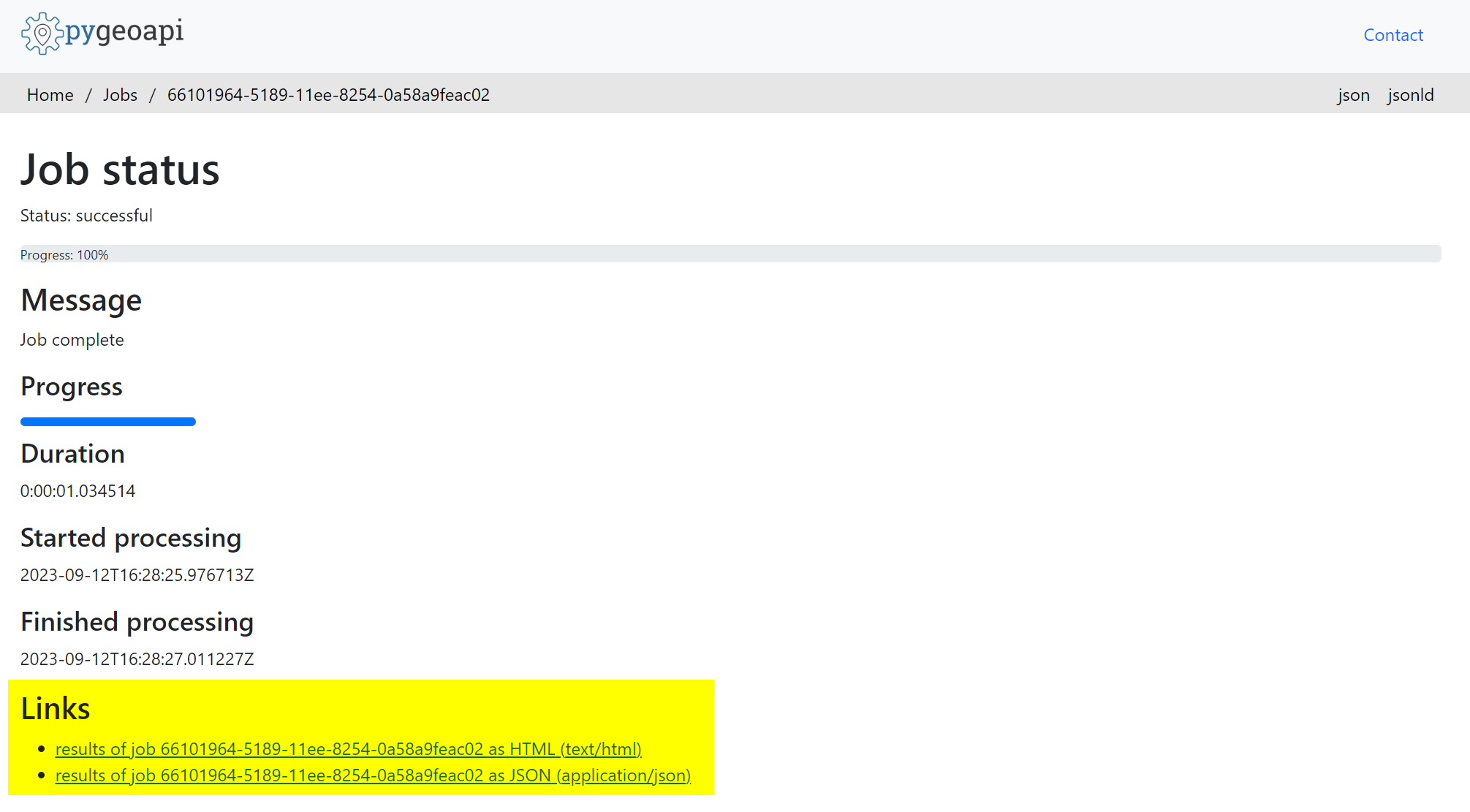
Note that you can also check the status of the job via the graphical user interface (GUI), which is provided as a web application. The Job log resource is available at this location
https://api.water.usgs.gov/gdp/pygeoapi/jobs
. Checking the job log page, we can see the job is listed with a status of successful, indicating the job is complete.

Retrieving results
To retrieve results of a completed job issue a request to the Job’s results location. The URL will be the location provided in the headers of the response to the original execution request with the additional /results?f=json appended to the end (e.g.
https://api.water.usgs.gov/gdp/pygeoapi/jobs/66101964-5189-11ee-8254-0a58a9feac02/results?f=json
). Below is an example request using python.
url = "https://api.water.usgs.gov/gdp/pygeoapi/jobs/66101964-5189-11ee-8254-0a58a9feac02/results?f=json"
#Note the `get` request
response = requests.get(url)
print(response.json())
Output of the print statement
{
  "id": "echo",
  "value": 1
}
Note that results can also be retrieved using the GUI by navigating to the location of the Job (e.g.
https://api.water.usgs.gov/gdp/pygeoapi/jobs/66101964-5189-11ee-8254-0a58a9feac02
) and then clicking on either of the result links at the bottom of the page.